Scripted Automatic Folder Creation
You can automatically create folders via script implementation. There are three events that are fired that you can use for the creation of folders:
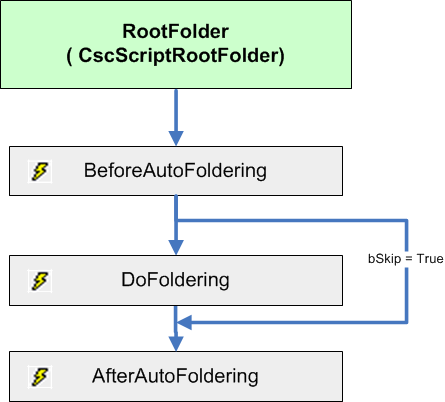
You can use script programming for those events to create and delete folders, and to reorder the documents in a batch. The script programming can be tested in the Transformation Designer Documents window or in Test Validation. For example, you may use the BeforeAutoFoldering event to skip foldering if a certain condition is fulfilled. You can use the DoFoldering event to create folders and to place the documents in those folders.
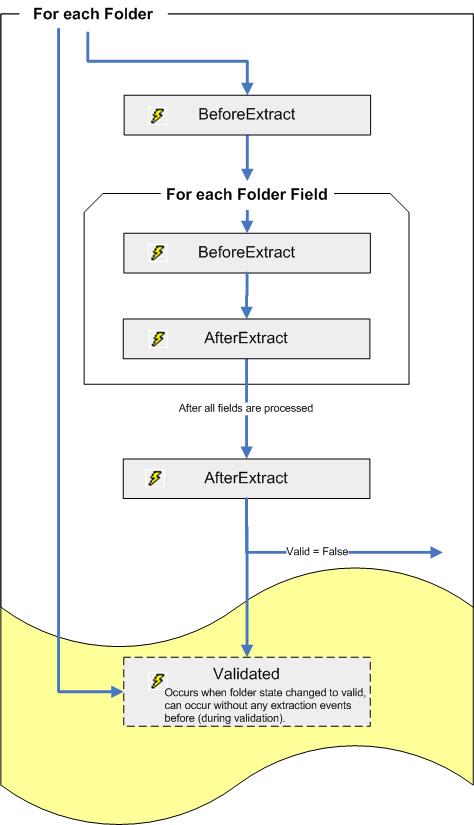
To perform folder field extraction you can either use the above described events or the Folder_BeforeExtract and the <FolderFieldName>_BeforeExtract events that are executed after the foldering events.
For the folder field extraction events at first the event sequence of BeforeExtract and AfterExtract events for any folder in your batch is performed and its folder fields is performed. At last this sequence is performed for the root folder and any configured root folder fields.