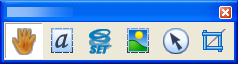
Tools from left to right:
The Hand tool is the basic navigation pointer. Choose it to finish the use of any other tool. Specify the Hand tool behavior in Edit > Preferences > General > Miscellaneous.
Select a text block for editing its properties, exporting, etc.
Select an image for editing its properties, exporting, etc.
Select an area for editing its properties, exporting, etc.
Select an object for editing its properties, exporting, etc.
Crop a page or a document – draw a rectangle and specify crop values.
 Related Topics