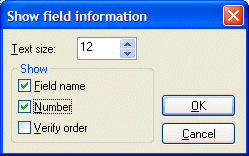
When you are working on a form definition, select ð Field information to access the Show field information dialog. Here you can select which information you want FORMS to show with each field on the screen.
When you select Field name, any indexed fields have their index displayed in parentheses next to the field name. Number refers to the order in which you defined them, and Verify order is the order in which the fields are to be verified. (You can change the verification order.)
Using the arrows next to the box, you can also adjust the size of the text that shows the information.
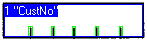
This field has its name and number displayed.
Adjusting the display using the Manager