A customer has used a form to order some clothing by mail as below:
|
Article name |
Article number |
Price |
|
Skirt |
12345 |
123 |
|
Trousers |
22447 |
320 |
In the FORMS form definition, the mail order company has named and indexed the fields on the form as below:
|
Article name |
Article number |
Price |
|
Name[1] |
Number[1] |
Price[1] |
|
Name[2] |
Number[2] |
Price[2] |
|
Name[3] |
Number[3] |
Price[3] |
|
Name[4] |
Number[4] |
Price[4] |
|
Name[5] |
Number[5] |
Price[5] |
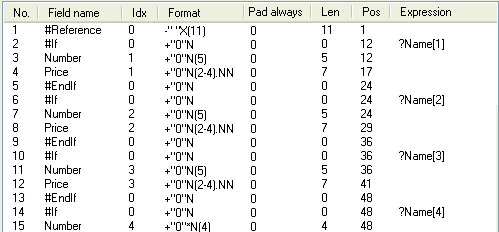
Now, suppose that the mail order company does not want the output data to include all the fields on the form, but only those which the customer has filled in. The transaction description could be written like this:
Since Name[1] and Name[2] are filled in, but Name[3] through Name[5] are not, the resulting data looks like this:
Formname,12345, 123,22447, 320,...
Without the #If and #EndIf transaction fields, the data would have looked like this:
Formname,12345, 123,22447, 320, , , , ,...
Another way to avoid spaces is to select Compact in the Transaction description options dialog.
Inserting conditional transaction fields into a transaction description