COM API
Hello World tutorial
This tutorial demonstrates the basics of creating an INVOICES plug-in using Microsoft Visual Basic 6.0. In this tutorial you will:
Creating an ActiveX DLL project
-
Create a new ActiveX DLL project using Microsoft Visual Basic 6.0.
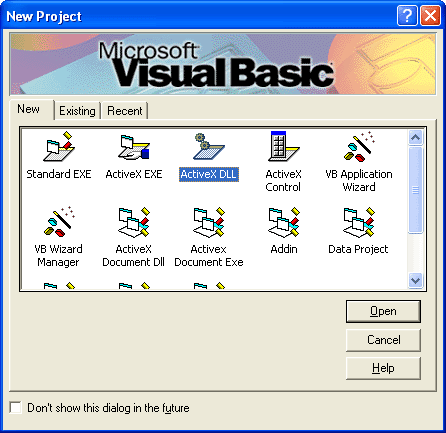
-
Rename the project to "HelloWorld" and rename the default class module to "clsServer". You will use these names later when you add the plug-in to Eilocal.ini.

-
Add a reference to the INVOICES type library.
The class code
The Hello World plug-in has three main functions:
-
Connect: Connects to an INVOICES module and subscribes to the AppStarted event in the Manager module.
-
OnAppStarted: Handles the AppStarted event that is subscribed to in the Connect function.
-
Disconnect: Releases memory allocated by the plug-in.
-
Copy and paste the code below into the clsServer module.
Option Explicit
Option Compare Text
' Declare a reference to the Application object
Private objEHApplication As EHICOM.Application
Public Function Connect(objEHIApp As Object, sIniFile As String, sIniSection As String) As Long
' Set the application object for future reference
Set objEHApplication = objEHIApp
' If it is the Manager module...
If objEHApplication.ModuleType = eiManager Then
' Subscribe to the AppStarted event
objEHApplication.Subscribe Me, "AppStarted", "OnAppStarted"
End If
' Return evtOK
Connect = evtOK
End Function
Public Function Disconnect(objEHIApp As Object) As Long
' Release memory
Set objEHApplication = Nothing
' Return evtOK
Disconnect = evtOK
End Function
Public Function OnAppStarted() As Long
' Display a message box.
MsgBox "Hello World!"
' Return evtOK
OnAppStarted = evtOK
End Function
-
Save the project.
-
Build the DLL and copy it to INVOICES' Bin folder.
Adding the plug-in to Eilocal.ini
In order to use the plug-in, it must be specified in Eilocal.ini. The sample below shows a typical Manager plug-in section with the HelloWorld plug-in specified in blue text.
;***********************
;* Manager *
;***********************
[Plugins::eimngr]
Plugin1=Common
Plugin2=Manager
Plugin3=DBAdmin
Plugin4=HelloWorld
[eimngr::Common]
Name=Common Dialogs
Type=COM
SupportIDispatch=TRUE
Classname=ReadSoft.INVOICES.GUI.Extensions.Plugin
[eimngr::Manager]
Name=Manager Dialogs
Type=COM
SupportIDispatch=TRUE
Classname=eimngrdlg.cserver
[eimngr::HelloWorld]
Name=HelloWorld
Type=COM
SupportIDispatch=TRUE
Classname=HelloWorld.clsServer
After you save Eilocal.ini, you can run Manager to see the result. The "Hello World!" message appears just after Manager starts.
Note: Microsoft Visual Basic automatically registers DLLs when you make them from the File menu. If you want to use a plug-in on another computer, you must register the DLL on that computer.
Related topics
Migrating INVOICES customizations to recent operating systems
Customizing INVOICES

