Workflow Recovery Console
The Workflow Recovery Console lets you restart or cancel invoice workflows.
Workflow Recovery
You gain access via the Recovery tab in PROCESSIT Adviser.
Access to the Recovery Console is restricted to administrators.
The Workflow Recovery screen provides an overview of workflow processes that have faults and have to be stopped or resubmitted.
- Locate any invoice and review invoice status.
- Cancel the outstanding processes on an invoice.
- Resubmit an invoice to restart the workflow process if it has failed.
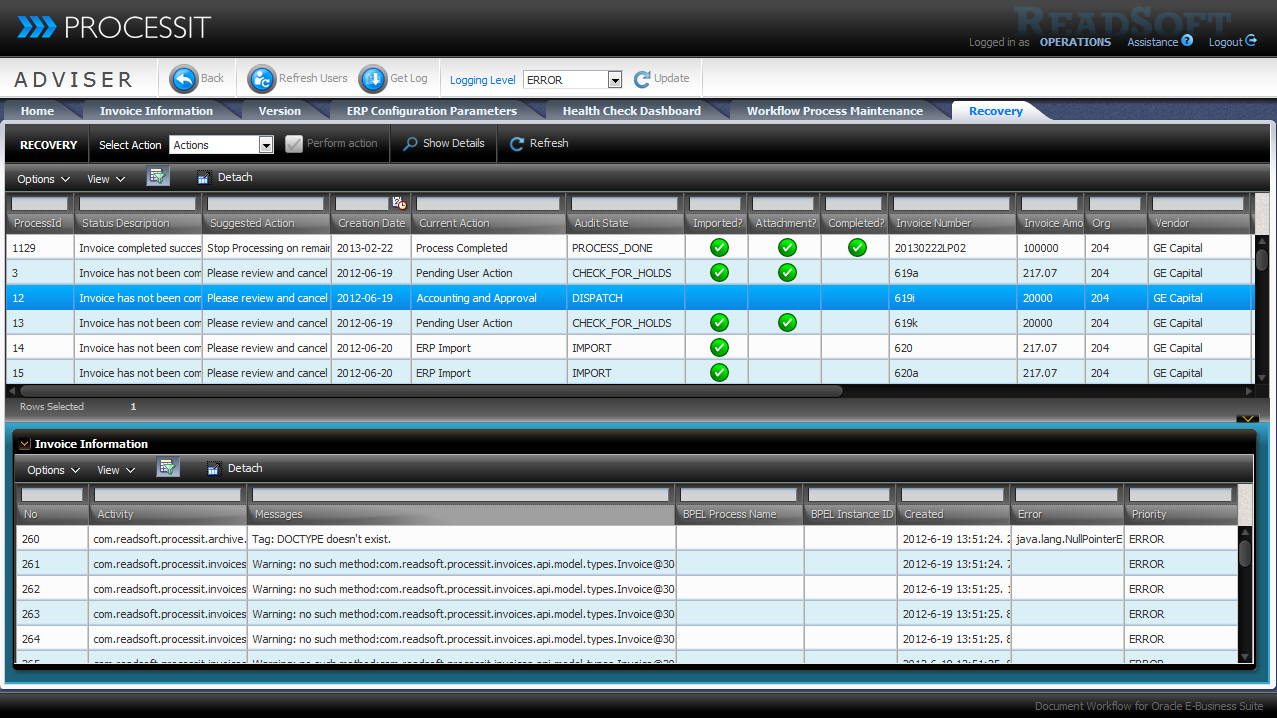
Recovery Tab Invoice List
In the Recovery table you see a list of all invoice workflows in the system, except for invoice workflows that are completed or currently in process.
In Process means they have outstanding human tasks, or that have been modified within the last 36 hours.
The list is sorted to show the oldest items that may require attention at the top, and with newer items that do not require anything at the bottom.
You can cancel or restart any invoice workflow in the list. The Status description and Suggested action columns give you a hint as to what action should be performed for an invoice.
Additional Columns are available for the Recovery Invoice List Table.
Recovery Tab Invoice Information
The Invoice Information Table shows the invoice activity history for the selected invoice. The table is only populated when a single row is selected in the Recovery table.
You can click Display Details in the Recovery table menu to see additional details for the invoice.
Actions for reprocessing an invoice
Stop processing: Stops any open BPEL flows related to the invoice(s), withdraws any open workflow items, and marks the invoice as complete in PROCESSIT. No further action is required. The history for this action is viewable only in the audit trail for the invoice available in the Auditor module.
Retry processing: Stops any open BPEL flows related to the invoice(s), withdraws any open workflow items, and resubmits the invoice at the start of the process. The invoice must be processed again. The invoice workflow is reset, and all actions previously performed for the invoice must be performed again. If accounting segments have been saved for the invoice, these might be available during reprocessing.
- Select the row(s) in the Recovery table to which the action should apply.
- Select the appropriate action from the drop down menu in the Recovery table header.
- Click Submit.
Workflow Process Management
PROCESSIT Adviser now offers advanced workflow process error handling, including faulted workflow process issue identification, and administrator rollback and reprocessing capabilities for one or more invoices in a user-friendly administration interface. Administrators can view current status description and system recommended actions to provide guidance on issue resolution. The Workflow Recovery screen provides an overview of workflow processes that have experienced faults, and have to be stopped or reprocessed.STOP PROCESSING invoices that are faulted and should be removed. RETRY PROCESSING for invoice workflows that should be restarted.
- Ensure consistency in rollback for possible faulted worfklows
- Suggested action columns give you a hint on what task that should be performed.
- Benefit from easily monitoring and maintaining outstanding invoices or possible workflow errors within PROCESSIT
- Support IT and Support staff by quickly finding invoices and see what happened to them when invoices are 'missing'
- Save time and Cost on troubleshooting
- Eliminate risks of missing invoice and help enhance SLA for IT
- System Admin
- IT Staff
- Support