ReadSoft Online Integration
Introduction
ReadSoft Online is ReadSoft's solution for capturing and verifying invoices in an online settings. Integration between the PROCESSIT and ReadSoft Online involves scheduled jobs synchronizing master data between the two environments and transfer verified documents to PROCESSIT. Once the integration is configured, users can log in to ReadSoft Online and upload invoices. The invoice is then verified in ReadSoft ONLINE and submitted for import to PROCESSIT, where they follow the normal process into the Oracle E-Business Suite Accounts Payable.
The integration connects the workflow with the cloud capture solution, using APIs to import master data from Oracle E-Business Suite to ReadSoft Online.
The main integration settings are handled via the main ReadSoft Online account provided with the license and PROCESSIT configuration parameters on site and user level.
An account must be setup and enabled in ReadSoft Online prior to integration configuration performed in PROCESSIT.
Integration Checklist
For the integration, you must have an account in ReadSoft Online that is configured to allow API access. During the integration setup, you need this information, which should be provided by ReadSoft Online after the account is created.
- Readsoft Online API Key
- Readsoft Online Version Key
- Readsoft Online User Account name and Password
- Readsoft Online Site URL
Configuration
Configure the appropriate PROCESSIT configuration parameters.
Data transfer
Two sheduled jobs are run to determine when and how often import of master data and invoice data transfer from ReadSoft Online to PROCESSIT happens. The jobs are scheduled via configuration parameters.
Master Data Transfer
When the master data import job is run according to the defined schedule, Master Data from Oracle E-Business Suite is transferred to and stored in ReadSoft Online. The master data contains user credentials along with organization access, and organizations with connected suppliers.
All users that should be replicated to ReadSoft Online must be defined prior to Master Data import in order to create them in ReadSoft Online.
Once the master data transfer has been run once, if there is no need to run it on a schedule, you can disable the job to ensure that no unneccesary network traffic takes place.
Document to Workflow Transfer
When the invoice import job is run according to the defined schedule, invoices that have been verified and marked as eligeble are pulled by PROCESSIT and begins the workflow procedure. Invoices received via ReadSoft Online follow the standard workflow procedures and are validated and matched according to standard PROCESSIT business configuration.
The invoice data is sent to the workflow, while the image is archived and referenced from the workflow tasks, according to PROCESSIT setup.
Online Account Administration
To control the main ReadSoft Online account settings for your integration, log in to the main account.
- Open a browser and navigate to the ReadSoft Online URL.
- Provide main account name and password.
- Click Login.
In ReadSoft Online, the left hand side column is a dashboard with account settings and options. The top level is your main account user name. The options beneath the top level designate the available features in ReadSoft Online.
You can view the basic profile information for the main account in the options. The Settings option contains the API-Key that is required to configure the integration.
In the top level Users option, there are no users besides the administrative account name. Standard users are managed under the customer entry corresponding to your company option.
Customers
This is the main option for users and data associated with your integration. There should be a single entry corresponding to your company beneath the Customers option. Select this entry to configure users, buyers (organizations), and suppliers for your integration.
User Administration and Assignments
Once standard users have been replicated, their roles and privileges in ReadSoft Online are viewed and managed in Users under the User Management option for the customer entry corresponding to your company.
Imported users from Oracle E-Business Suite are shown and managed in the Users option. Email must match the email defined for the user in Oracle E-Business Suite.
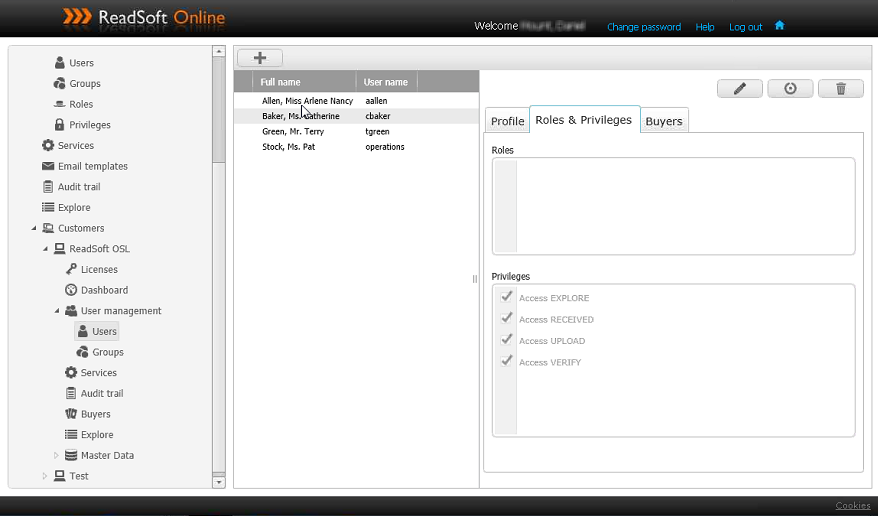
- Profile shows details about the currently selected user.
- Roles and Privileges defines the user roles and privileges for the currently selected user. The privileges are the modules accessible by the user, and thereby also define the type of tasks they can perform.
- Buyers define the organizations that the user is allowed to access. This corresponds to permissions for organizations in Oracle E-Business Suite and is set during master data import. You can change the settings here, but note that they will be reset to match the ERP settings when master data import is run.
Remember that when access is granted to a new user, the master data import must run before the user is available in ReadSoft Online.
Master Data
Contains data entries for the imported master data. The data here is imported from Oracle E-Business Suite according to the master data import schedule. You should not edit data here, but rather run the master data import when relevant changes are made in Oracle E-Business Suite.
- Buyers contains all organizations.
- Suppliers contains all vendors for all organizations, organized pr. organization.
Processing Documents
User Password Management
When a user is replicated in ReadSoft Online, they receive an email containing their login credentials. The email is sent to the email set for the user in Oracle E-Business Suite. You must use the initally generated password for the first log in, but can then change the password. User passwords for ReadSoft Online are not synched with any other passwords, including Oracle E-Business Suite passwords, and must be maintained individually.
Using ReadSoft Online
Login with a standard user that has been granted access via configuration. You can access tasks and roles that are set in by privileges in the administrative user management.
For details on using ReadSoft Online, please refer to standard documentation for ReadSoft Online.
Dashboard
An overview of the tasks involving the current user.
Upload
Upload invoice images to begin the data capture process.
Verify
Verify captured invoice data and correct discrepancies. Once an invoice has been successfully verified, it is marked as verified. During the next scheduled run of import to PROCESSIT, the invoice is transferred to the workflow, and the approval process begins.
Explore
Search documents handled in ReadSoft Online.