View: V_StepsReports
This view contains information about an executed process step. It shows the names (labels) of the objects (process steps, clients, etc.) instead of their IDs. This view is used for reporting – see Sample report: Processing Report.
 Diagram: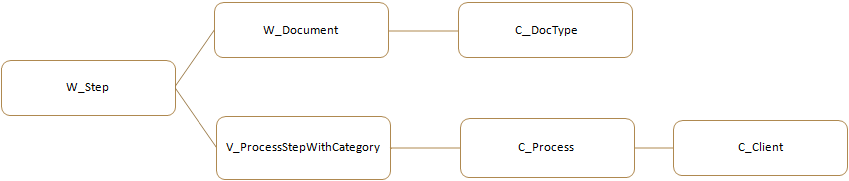
A similar view: V_Steps
Column | Description |
DocumentID | The ID of the document (ID in W_Step). |
DocumentSiteId | Currently not used. |
DocumentName | The name of the document (Name in W_Document). |
DoneAt | When the step was executed (DoneAt in W_Step). |
CheckOutDuration | The period of time in seconds during which the document was checked out for this step. (CheckOutDuration in W_Step.) |
Action | Create (ActionType in W_Step) |
DocType | The ID of the document type (TypeID in W_Document). |
DocumentType | The name of the document type (Name in C_DocType). |
ProcessStepID | The ID of the process step (ProcessStepID in W_Step). |
ProcessStep | The Name of the process step (Name in C_ProcessStep). |
Process | The name of the process (Name in C_Process). |
Client | The name of the client (Name in C_Client). |
UserName | The Windows user in whose name the process ran (UserName in W_Step). |
Machine | The computer on which the process ran (Machine in W_Step). |
ID | The ID of the process step (ID in W_Step). |
SiteId | Currently not used. |
DateOnly | Only the date (not the time) from the DoneAt field. |
CheckOutDurationHours | The period of time in hours during which the document was checked out for this step. |
RepCatName | The name of the reporting category (ReportingCat in V_ProcessStepWithCategory). |
BatchID | The ID of the root document (BatchID in W_Step). |
ActionType | 0 = Create (ActionType in W_Step) |
ReportingCatID | The ID of the reporting category (ReportingCatID in V_ProcessStepWithCategory). |
ServiceType | 0 = Activity (ServiceType in V_ProcessStepWithCategory) |
SQL Script
AS
SELECT dbo.W_Step.DocumentID,dbo.W_Step.DocumentSiteId,dbo.W_Document.NameASDocumentName,dbo.W_Step.DoneAt, dbo.W_Step.CheckOutDuration,
CASE ActionType
WHEN 0 THEN 'Create'
WHEN 1 THEN 'CheckOut'
WHEN 2 THEN 'CheckIn'
WHEN 3 THEN 'CheckInWithError'
WHEN 4 THEN 'RoutedManually'
WHEN 5 THEN 'CheckIn'
WHEN 6 THEN 'CheckIn' END AS Action, dbo.W_Document.TypeID AS DocType,
CASE TypeID WHEN 0 THEN ' ' ELSE dbo.C_DocType.Name END AS DocumentType, dbo.W_Step.ProcessStepID,
dbo.V_ProcessStepWithCategory.ProcessStepName AS ProcessStep, dbo.C_Process.Name AS Process, dbo.C_Client.Name AS Client,
dbo.W_Step.UserName, dbo.W_Step.Machine, dbo.W_Step.ID, dbo.W_Step.SiteId, CONVERT(datetime, CONVERT(char(10), dbo.W_Step.DoneAt, 112))
AS DateOnly, dbo.W_Step.CheckOutDuration / 3600 AS CheckOutDurationHours,
CASE WHEN NOT dbo.V_ProcessStepWithCategory.ReportingCat IS NULL)
THEN V_ProcessStepWithCategory.ReportingCat ELSE ' ' END AS RepCatName, dbo.W_Step.BatchID, dbo.W_Step.ActionType,
dbo.V_ProcessStepWithCategory.ReportingCatID, dbo.V_ProcessStepWithCategory.ServiceType
FROM dbo.C_Client INNER JOIN
dbo.C_Process ON dbo.C_Client.ID = dbo.C_Process.ClientID INNER JOIN
dbo.W_Step INNER JOIN
dbo.W_Document ON dbo.W_Step.DocumentID = dbo.W_Document.ID AND dbo.W_Step.DocumentSiteId = dbo.W_Document.SiteId INNER JOIN
dbo.V_ProcessStepWithCategory ON dbo.W_Step.ProcessStepID = dbo.V_ProcessStepWithCategory.ProcessStepID ON
dbo.C_Process.ID = dbo.V_ProcessStepWithCategory.ProcessID LEFT OUTER JOIN
dbo.C_DocType ON dbo.W_Document.TypeID = dbo.C_DocType.ID