Kofax SignDoc Standard 2.1.0.1 - Administration Center Online Help
Enable and configure the plugin
Enabling the plugin for a specific account can be done by either the server administrator or an account administrator.
The server administrator will use the Administration Center, similar to the example above, but will edit an individual account setting instead of the global settings for all accounts.
The account administrator can use the manage client to perform the same operation.
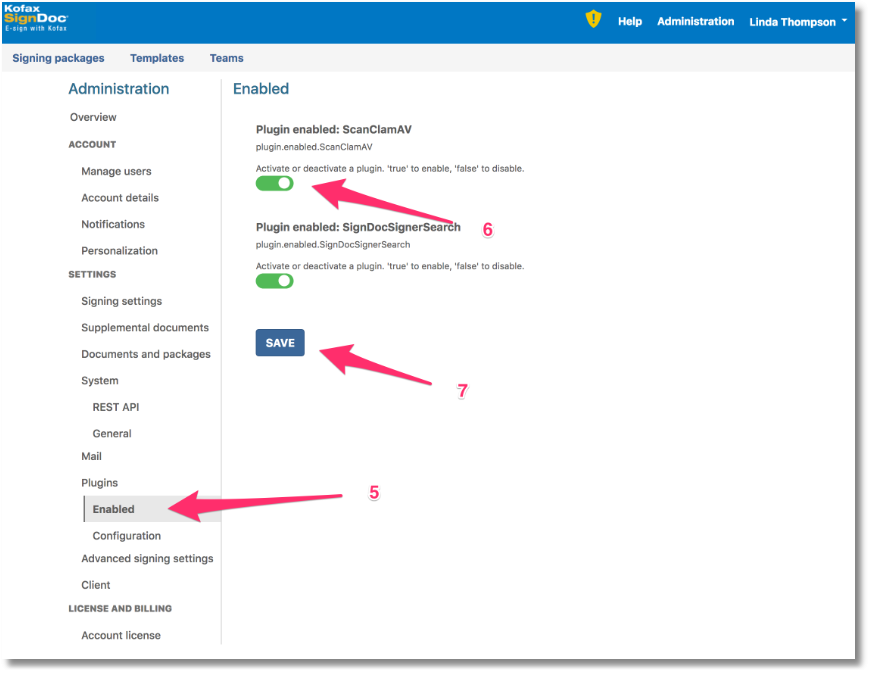
Log into the manage client with account administrator credentials.
Go to the Administration section and find Plugins, Configuration. Find the ClamAV URL setting and point it to the ClamAV server you are running. Save the setting.

Change to the Enabled section and enable the plugin by sliding the switch to on, then save the setting.
The plugin will be loaded and will be available for the account you configured only.
To make the plugin available for a different account you will have to log in as an account administrator for the other account and repeat the process. You can use different settings for different accounts. In case of the ClamAV plugin, different accounts can use different ClamAV scanning servers.