Kofax SignDoc Web 2.1.0 - Online Help
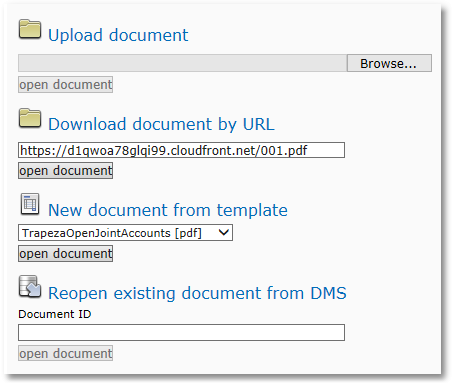
The SignDoc Web demo page supports different ways of loading and displaying a PDF document.
Upload document
Using the  Upload document option it is possible to load and display a preferred PDF document into SignDoc Web by selecting this document via file selection dialog. To upload a document, please perform the following steps:
•Click the Browse... button
•Standard file selection dialog will be opened
•Please browse for a preferred PDF file
•Click the open document button
•The selected PDF document will be loaded and displayed in the SignDoc Web application
Download document by URL
Using the Download document by URL option a PDF document can be downloaded by URL and displayed in the SignDoc Web application. To download a document by URL, please perform the following procedure:
•Specify a download URL in the text field (see Integration in external Web Application for a detailed description of how to make proper URL requests)
•Click the open document button
•The selected PDF document will be downloaded and displayed in the SignDoc Web application
New document from template
With the  New document from template option a predefined template, that is installed on the server, will be loaded and displayed in the SignDoc Web application. To create a new document from a predefined template, please perform the following steps:
•Select from the drop down list one of the available PDF templates
•Click the open document button
•The selected PDF document will be loaded and displayed in the SignDoc Web application
Reopen Existing Document from DMS
With the  Reopen existing document from DMS option it is possible to reopen a document, that is stored in the internal document management system (DMS).
To reopen a document, please perform the following steps:
•Specify the Document ID of the document that you would like to reopen in the text field Document ID
•Select the document management system plugin (default: SignDoc Web File DMS)
•Click the open document button
•The PDF document with the specified Document ID will be opened