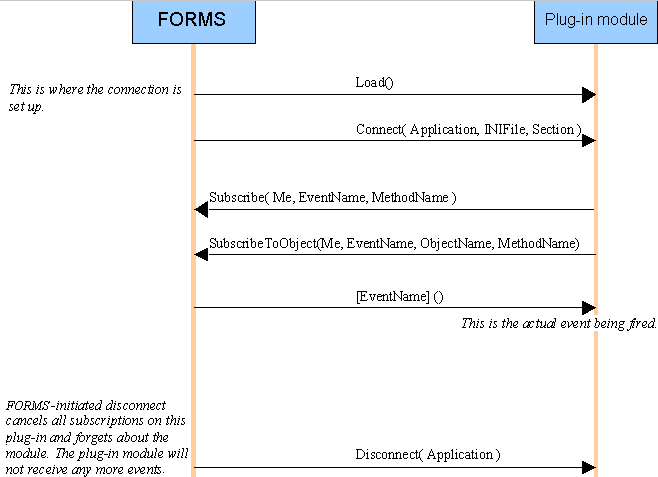
When FORMS extensions are initialized, a link is created between FORMS’ Application object and the extension.
After an extension is loaded, FORMS calls its Connect method. The name (and path, in FORMS 5-3 and later) of the ini file and the name of section for this extension are passed as parameters together with one of FORMS’ application objects.
The purpose of the Connect method is to save a reference to the application object to be used later on. If the extension needs extra configuration information, it can read it from the ini file and section that were passed as parameters in the Connect call.
During initialization, the extension must set up the events it needs. This is done via several calls to FORMS’ Subscribe and SubscribeToObject methods .
There are two optional functions, not shown in the figure above, that the extension might call:
|
Optional function call that terminates the subscription for a particular event. |
|
|
Extension module initiated Disconnect. FORMS cancels all subscriptions on this module and forgets about the extension. |
ReadSoft programs usually use DLL extensions internally, so normally you do not need to use this feature.
Plug-in methods to use in extensions for FORMS