Padding in text styles
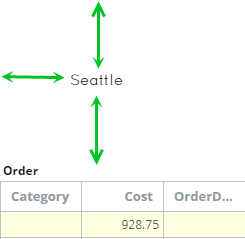
You can set or edit padding for a text style. Padding affects how much space (in pixels) appears between the text and borders and between the component border and an inner element.
- On the Documents Tree, navigate to Themes.
-
Select a theme, navigate to a text style (marked by
T), and click the
Edit icon.
The Text Style Editor window appears.
-
Select the check box and set values for padding (Left, Up, Right
and Down). Padding is measured in pixels.

- Click OK.
- Save the theme.