Extraction Training Set conversion
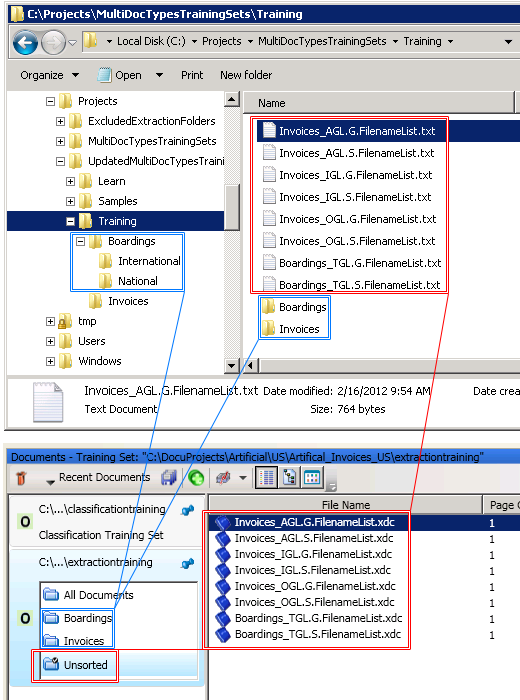
A converted Extraction Set contains a document subset for each training directory. If a directory contains subdirectories, the contents of those subdirectories are merged into the document subset for their parent directory. Any documents pending editing are added to a document subset called Unsorted and this is the default document subset.
Any directories that are excluded from training in the old "Training" directory hierarchy are also in the new document set structure as excluded document subsets. This ensures that the hierarchy of your training documents is not lost during conversion.
For the best results, resolve any outstanding conflicts in a previous version of the Transformation Designer before opening the project and converting your old training sets to document sets and subsets in the Transformation Designer 7.6.0. If this is not possible, you can retrain the project after conversion to recreate the conflicted files.
In the example image below, the documents in the root of the
Training folder are moved into the
Unsorted
document subset and two subsets are created for each of the
Boardings
and
Invoices
folders. Document subsets cannot be nested, and since the
Boardings
folder has subfolders called
National
and
International
, all of the documents in these subdirectories are merged into the
Boardings
document subset.