Indexed fields, or fields in a series, are two or more fields that are handled identically by FORMS. They are usually located close to each other on the form. One example is a column or row of mark boxes.
You can double-click the boxes to select multiple field areas and then define them together, if the fields are to contain the same type of information to be interpreted.
Define two or more field areas. The most recently drawn frame is red, while other frames in an undefined series are green.
Select Edit ð Field ð Define and continue the process by choosing the field type.
FORMS can find identical field areas within an area you indicate. This is particularly useful when there are many fields to be handled identically.
Double-click the first box in a series.
Draw a large frame around an area that includes all the field areas in the series (including the first one that is double-clicked). FORMS searches for field areas of similar size within this area and automatically selects the ones that it finds.

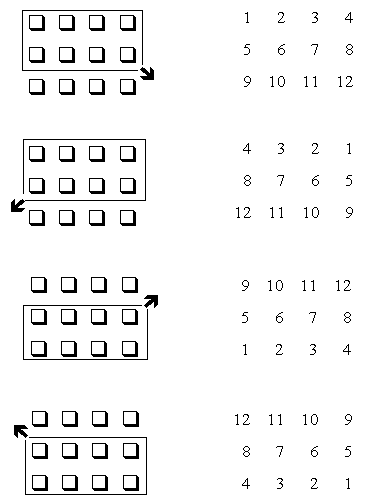
Note: The way you draw the search area determines how the resulting fields are indexed (numbered). There are four different ways of drawing the search area.
Look carefully to ensure that FORMS finds all the field areas. FORMS can miss them if lines of boxes are too thin or not solid, for example.
If some field areas are missing:
Select Edit ð Field ð Delete latest selection (or press Delete on your keyboard) to erase one frame at a time in reverse order, back to the first missing field area.
Continue the series then by adding the missing field areas using support lines or by double-clicking.
When all the field areas are defined, press F5 or F6 and continue the process by choosing the field type.
All the fields in a series are given the same name (the one you type in), but each has its own index based on the order in which you drew the fields or the search area.
The frames of fields already defined are blue if not selected and red or green if selected. When selected (to select, simply click them), their definitions can be modified.