
Original color.
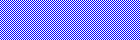
A graphic wash of the same color. This is printed as a screen, meaning that it is actually finely spaced dots of a dark color, mixed with the paper color to create a lighter color.

Same as above, but magnified five times.

Problem: Your scanner’s resolution is different from the printing company’s screen. Visualize this as a mask or template with holes punched through.
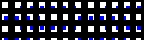
Imagine this template placed over the image to be scanned. The scanner sees the graphic wash as white in some areas, and blue in others, because the patterns do not match.

The result is a moiré pattern, which is an uneven pattern of noise on the scanned image. This reduces FORMS’ interpretation rates. When you encounter this problem on existing forms, use a despeckle filter to remove the noise.