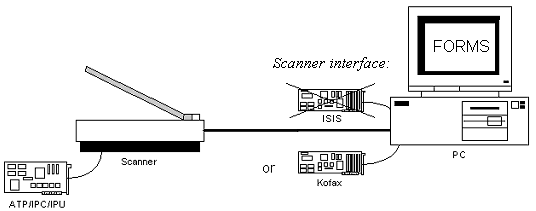
Referring to the picture below (which shows a PC with FORMS and a scanner) and the table below it, you can see where you can adjust scanner settings and what effects the settings have.
|
Settings in... |
can be adjusted in this dialog... |
and they affect... |
|
FORMS |
Which scanner is used |
|
|
FORMS |
FORMS’ own image handling. Interpretation is affected, as are image files created by the program. |
|
|
ISIS interface |
You cannot make any adjustments using the ISIS interface. However, many scanners have their own built-in image enhancement functions. See Advanced scanner settings: ISIS settings and click the link to the topic that describes your scanner. |
Not applicable. |
|
Kofax interface |
Kofax settings dialog.* |
Images before the program receives them. Affects interpretation. |
|
The scanner itself |
Choose one, depending on your scanner and interface: Kofax: Kodak (ATP), Fujitsu (IPC), or Böwe Bell + Howell (ACE) ISIS: Kodak (ATP), Fujitsu (IPC), Ricoh or Böwe Bell + Howell (IPU), or Böwe Bell + Howell (ACE) |
Images before the program receives them. Affects interpretation. Affects image files created by FORMS, including appendices. |
* If you are using Virtual ReScan (VRS), adjust it using the VRS Scanner Configuration Utility and VirtualReScan Administration Utility. For additional information about the settings, please refer to Installing and Configuring Virtual ReScan (VRS). (Nothing happens when I click the link.)