Some countries have different tax rates for different things, and companies paying an invoice need to know how much tax they are paying and at what rates. Tax tables contain that information, often in table format.
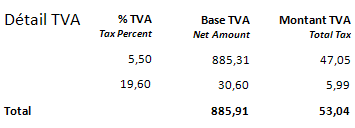
Example from a French invoice:
Example of a tax table on another invoice (with the corresponding INVOICES field type):
| Taxable amount (VAT_BaseAmount) |
Percent (VAT_RatePercent) |
Tax (VAT_RateAmount) |
Total (VAT_TotalAmount) |
| 100 | 10 | 10 | 110 |
| 1000 | 20 | 200 | 1200 |
| 500 | 10 | 50 | 550 |
Functionally, both tax tables and bank account tables contain line items. However, they are handled somewhat differently and are therefore described separately.
Depending on which and are selected when you create the invoice profile, the profile may contain a suitable tax table by default.
Otherwise, to capture tax information like this, you must add a table field profile. Select as the table .
Using Manager, define each column in the tax table as its own tax field profile.
After optimization, you verify tax data just as you would verify other line item fields.
INVOICES can capture multiple tax rates and tax amounts using advanced business logic. This allows INVOICES to check and validate the tax rates to ensure that the information is correct. See Multiple tax rate handling for details.
Data from tax tables can be included in transaction descriptions (instructions).
Tax tables can only be found on the first page of the invoice.
You can only capture data from one tax table (VATTable) per invoice.
If the tax information is not in table format, as it is in the example above, you can still use a table field profile. The Verify operator will have to manually enter the correct data. Otherwise, especially in countries where only one tax rate is used, the tax information is best captured in single item fields.