PROCESSIT Accounting
Purpose
Via the PROCESSIT interface you can handle invoices without references to purchase orders. Invoices can be altered, accounted and approved before import to Oracle E-Business Suite AP.
Learn how to supply GL account code combinations for General Expense invoices and submit them for approval.
Get introduced to advanced invoice handling functionality, including splitting lines and Descriptive Flex Fields.
Audience: Accounts Payable personnel using PROCESSIT to process and handle incoming supplier invoices.
Presentation prerequisistes
Prior to this session, it is recommended to have an understanding of:
- PROCESSIT Console Worklist
- PROCESSIT WebTest
GL Accounting Procedure
- An invoice without a purchase order is received, scanned and interpreted.
- A workflow notification is sent to an account coder.
- The coder supplies accounts for the invoice lines ...
- ... and submits the invoice for approval.
- An approver checks the invoice and submits it for import to Oracle Accounts Payable.
- The invoice record is available in Oracle AP, ready for payment.
- The scanned invoice image is attached to the record in Oracle AP.
Check out the workflow diagram.
Project Accounting Procedure
- A project-related invoice is received, scanned and interpreted
- The invoice is routed to a defined coder for accounting.
- The project coder supplies project account information ...
- ... and then submits the invoice for approval.
- A project manager approves the invoice and submits it to Oracle Accounts Payable.
- The invoice record is ready for payment in Oracle AP.
- The scanned invoice image is attached to the record in Oracle AP.
Task Details
The Task Details screen is used for invoice accounting, and invoice approval. Most of the features associated with standard invoice processing are applied via this screen.
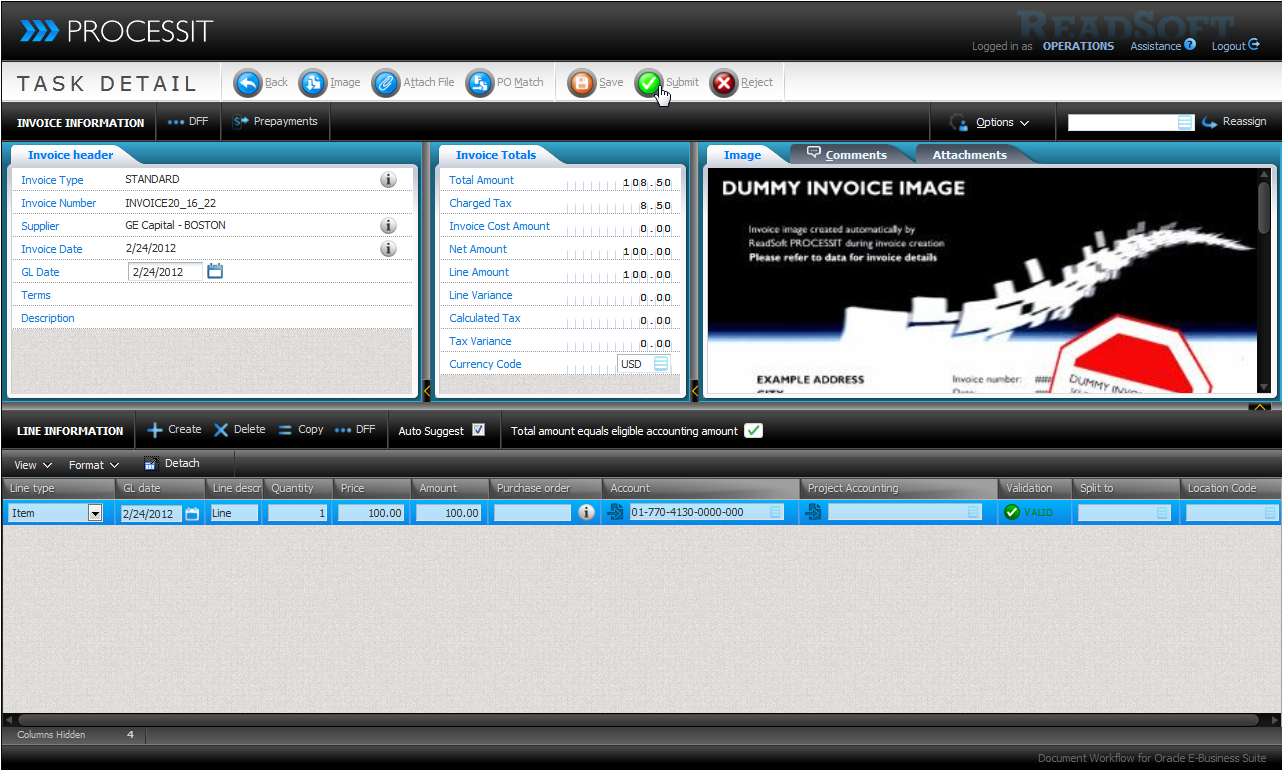
Task Details Main Menu
 Back: Returns you to the Console Worklist
 Image: Download the image related to the task.
 Attach file: Attach a file to the document. The file is linked to the ERP entry.
 PO match: Lets you match the invoice to a purchase order via Manual Match
 Save data: Saves an validate the current information.
 Submit: Submits invoice for approval according to hierarchy or import to ERP.
 Reject: Rejects the invoice and sends a notification to a workflow administrator.
 Return to coder: Assign the task to the account coder. Available during approval.
 Revert split: Returns all split invoice lines to the dispatcher. Available to dispatcher.
Invoice Information Menu
 DFF (header): View and edit descriptive flex fields on invoice header level.
 Prepayments: Apply and maintain invoice prepayments.
 Reassign: Reassign (transfer) the invoice task to the user defined in the reassign field.
Options
 Maintain Aliases: Configure aliases for commonly used Gl codes.
 Workflow Messages: Disable action history notifications for the invoice.
 Validate DFF values: Perform an additional validation of entered dff values.
Invoice Information
- Invoice Header: View and edit invoice header information. Click the info icons for details.
- Invoice Totals: The amounts and currency for the invoice. Edting currency can be enabled. All amounts are updated when you save the invoice.
- Image: Scanned invoice image.
- Comments: View and add comments that are imported to the ERP system.
- Attachments: View, download or delete invoice attachments that are linked to from the ERP system.
Field availability is based on application configuration.
Line Information - Menu options
 Create a new invoice line for the invoice.
 Delete the currently selected invoice line.
 Copy the currently selected invoice line.
- DFF edits Descriptive Flex Fields for the currently selected invoice line.
- Auto Suggest can disable suggestion of code combinations to increase performance.
 Total amount equals eligible accounting amount shows if the coded amount matches the total amount that should be coded.
Line Information Content
- Line Type: Item, freight, tax, miscellaneous
- Line Description: Invoice line description, important for manual matching.
- Quantity, Price and Amount: Values for the corresponding line in invoice currency.
- Purchase Order: View/edit po reference for the invoice line.
- Account: Invoice line GL code combination
- Project Accounting Invoice line project account information
- Distribution Set: Apply distribution set to the invoice lines.
- Validation: A green checkmarks indicates that the code exists in the ERP system.
- Split To: Split invoice lines to these users upon submit.
- GL Date: View/edit GL Date. Populated by workflow if disabled.
- Purchasing Category: View/edit the Purchasing Category.
- Ship to Location: View/edit the location code for the invoice line.
Field availability is based on application configuration.
Providing Accounts
Applying Account Code Combinations
- Type the account in the field or use the Accounting Pop-up.
- Use an alias by typing it and selecting it from the autosuggest list.
- Multiaccounting and segment descriptions are available in the accounting pop-up.
- The Validation Column indicates if the supplied account code exists in the ERP.
- The status indicator shows if the amount eligeble for accounting has been met.
- Submit the invoice for approval or ERP import.
Multiaccounting
- Check the Multiaccounting checkbox
- Select to either Override or keep existing code combinations.
- Select the line types that should have the same combination applied.
Distribution Sets
- For invoices with Oracle distribution sets, the appropriate invoice lines based on the distribution set are created automatically, both for GL and project accounting.
- If a supplier has a default distribution set, the distribution set is automatically populated on all lines for imported invoices.
- The coder can apply a distribution set by selecting it from an invoice line distribution field or using the accounting pop-up.
Creating Accounting Aliases
- Navigate to Task Details
- Open the Maintain Accounting Aliases window. (Options or CTRL+ALT+M)
- Click Create alias.
- Define the Alias name. This is used to apply the alias to a line.
- Provide a description.
- Select the account code combination in Alias segments.
- Click Save
To use an Alias, open an accounting popup and select the Alias name, or type part of the alias and select it from the suggestion list in the accounting field.
Attach a file
You can attach supporting documents and image files to the invoice.
Attachements are available via links from the imported invoice record in the ERP system.
- Click Attach File and browse for a file in the pop-up.
- The file is uploaded and attached.
- You can view all attachments in the Attachments tab.
- You can download attachments by clicking Download.
- You can delete attachments by clicking Delete.
Splitting an invoice to multiple coders or approvers
- Provide username in the Split To field.
- If no user is supplied, standard routing applies.
- The user splitting the invoice is the dispatcher.
- Each user receving invoice lines must coder/approve those individually.
- When all invoice lines are approved, the invoice is approved and imported as one, according to standard business rules.
- Split invoices are marked with an asterisk * in PROCESSIT search.
To revert a split invoice an invoice-line receiver must reassign the task to the dispatcher, who can then recall all lines by clicking Revert split.
Prepayments
A single Prepayment distribution line and amount can be applied to an invoice.
A Prepayment Hold can be applied to the invoice.
The system can be configured to put a Prepayment Hold on all invoices with prepayments.
Applying a prepayment
- Click Prepayments in Task Details.
- Select a prepayment distribution line.
- Type the appropriate amount.
- Click the Plus icon on the selected line.
- The applied amount cannot exceed the available prepayment amount.
- Click the Revert icon on a line to revert the selected prepayment.
- To see who has applied a prepayment, hover the checkmark for the applied prepayment line.
Prepayments for automatically matched PO invoices are handled in a separate task.
Invoice Rejection
- Invoices can be rejected during accounting, matching or exception flows.
- A reject reason is required when rejecting an invoice.
- Click Reject in Task Details to reject an invoice.
- Select Reject or Cancel in the action selector in Modify Invoice or Payables Maintenance.
- A Superuser receives notifications for all rejections.
- Rejected invoice are handled in the Modify invoice window.
- Invoice data is corrected and the invoice flow is either retried or cancelled.
- The reject reason can be emailed to the supplier if the superuser cancels the invoice.
The Reject Reason can be selectes from a list of predefined rejection messages.
Tax Handling
Tax for Oracle E-Business Suite R12
Tax in Oracle E-Business Suite R12 is handled by the tax engine in Oracle. In PROCESSIT, users are not prompted for any tax information except the invoice tax amount. The balance checks for an invoice subtracts the tax amount from the amount eligible for coding.
If the tax engine in Oracle E-Business Suite is not configured, you can enable a tax engine in PROCESSIT. The PROCESSIT tax engine assumes that no automatic tax calculation is setup in Accounts Payable or for any suppliers.
Prior to invoice import, the tax engine distributes the invoice tax amount according to the supplied accounting coding information on the invoice lines. The tax engine includes GL account combinations, project accounting and distribution set. If invoice lines are matched to purchase order lines accounting is found on the purchase order distribution, with the exception that Account ID is taken from a parameter if purchase order lines contains inventory items. The generated tax lines have the type Item, since it is assumed that tax has not been setup.
Tax for Oracle E-Business Suite 11i
Tax codes must be supplied on the invoice lines. The invoice tax amount is calculated based on the supplied tax codes.
Prior to invoice import, the system checks how the supplier is setup. If no automatic tax calculation has been defined for the supplier, the system inserts tax lines according to the supplied tax codes.
This method is suited for an Oracle E-Business Suite configuration where automatic tax calculation is setup on Accounts Payable level with a mixed supplier setup, where suppliers have either automatic tax calculation on line, on header or no tax calculation applied.
If no tax is setup in Oracle and If the PROCESSIT tax engine is enabled, users are not prompted to supply tax codes.
Prior to invoice import, the tax engine distributes the invoice tax amount according to the supplied accounting coding information on the invoice lines. The tax engine includes GL account combinations, project accounting and distribution set. If invoice lines are matched to purchase order lines accounting is found on the purchase order distribution, with the exception that Account ID is taken from a parameter if purchase order lines contains inventory items. The generated tax lines have the type Item, since it is assumed that tax has not been setup.
You can use PROCESSIT Search to seach for and view document details.
Accounting and Approval Scenarios
Perform GL accounting and submit an invoice. It is not approved due to Owner can not approve.
Perform GL accounting and approval for a similar invoice, with Owner can approve enabled. The invoice is approved
Perform project accounting and approval for an invoice that the coder can approve.
Try rejecting invoices during an accounting task and during an approval task.
In each case, you must follow the invoice workflow.
Limited Workflow version
Create a GL invoice workflow for PROCESSIT Limited Edition version.
Make sure to adjust the necessary PROCESSIT configuration.
Matching Invoices to Purchase Orders
The primary benefit of PROCESSIT workflows it the automatic matching to purchase orders, which is done according to business rules. You can learn more about matching invoices in the following presentation.