Extract Barcodes activity
This activity recognizes and extracts barcodes from media and adds the barcodes to the media as records.
Unless configured otherwise, blank pages ( property = true) are excluded from barcode extraction. You can test the recognition using the link.
Note: This activity must be assigned to an Activities Service in order to run.
If for some reason you need to add this activity to the Process Designer, the file to add is xboundActBarcodeDetection.dll.
These settings are available when extracting barcodes from documents:
Properties tab | |
Select the barcode types to include (see Supported barcodes). Patchcode and Pharmacode barcodes cannot be detected at the same time as other barcodes but must be configured as separate steps. | |
Select one of these options:
| |
Tries to find barcodes even on supposedly blank pages. | |
Recognizes barcodes only on TIFF media. (Otherwise both TIFF and JPEG.) | |
Recognizes barcodes only on front pages, not on back pages. | |
Select this option to replace control characters in the barcode with a question mark. | |
Type a regular expression here if you want to recognize only barcodes that match this expression. | |
| |
link | Opens the dialog. |
Advanced tab | |
The intensive search provides more accurate results but takes longer. | |
Use and to specify (in pixels) the top right corner of where you want to start searching for barcodes. Use and to specify the size of the search area in pixels. Alternatively, click and use your mouse to specify the search area. | |
Recognizes barcodes with confidence levels below 100%. | |
Minimum level of confidence in the barcode to recognize it. | |
Select this option in order to use custom settings instead of the automatic barcode recognition settings. Then the below settings become available. | |
The minimum height (measured in pixels) that a barcode must have in order for it to be recognized. | |
The maximum height (measured in pixels) that a barcode can have and still be recognized. | |
Mode of barcode recognition. ( | |
Reading direction given in degrees. | |
Interval (measured in pixels) within which barcodes are searched for (i.e. the horizontal spacing before and after the barcode). 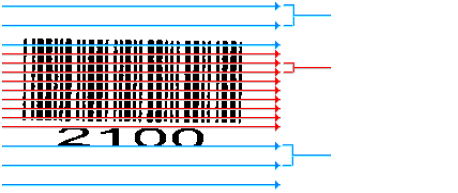 Scan distance Barcode expected Scan distance barcode Barcode ends Scan distance | |
Maximum tilt of the barcode (line tolerance of X axis) in pixels. | |
The minimum number of white pixels that are expected around the barcode. 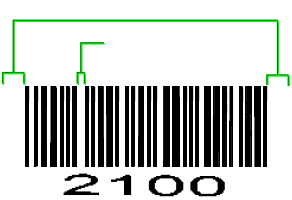 Light margin on each side Maximum gap Note: The light margin must be wider than the widest gap and the widest black line in the barcode. If the gaps between the lines in a barcode are so large that they are recognized as a light margin, the barcode will not be extracted. | |
The scanning of the image in the Y direction is carried out in steps measured by the height of the "scan distance". The value is in pixels. The value of should be less than or equal to the value of . You can reduce this value if barcodes are poorly printed. Optimal results are achieved by setting to 1. However, this slows performance. (The higher the value, the faster the performance.) | |
Maximum gap (measured in lines) within a barcode. If more than the specified number of lines is searched in vain for more of the barcode, then the barcode is considered complete. | |
| The maximum rotation at which a barcode can still be recognized. Normally 8° is sufficient. Specify a higher value only when more extreme rotation or skew is expected. The greater the angle, the longer extraction takes. | |
link | Opens the dialog. |
 for example using
a process rule
for example using
a process rule
These settings are also available:
button | Imports settings from an XML file that was previously created using . |
button | Exports the settings to an XML file. Specify the file name and location. You can then import the XML file to get the same settings. See Exporting and importing process step settings. |
link | Opens a test form, where you can (when applicable) check a regular expression. |