Adjusting the Document Verifier display
When you are working in XBOUND Document Verifier, you have these options for adjusting the display:
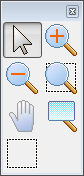
To display
 this convenient toolbar, select > . You can then drag the toolbar into any position in
Document Verifier.
this convenient toolbar, select > . You can then drag the toolbar into any position in
Document Verifier.To display or hide the pane, select > .
To arrange thumbnail images horizontally, select > . (This affects both the and panes.)
To arrange thumbnail images vertically, select > .
To display the sheet number within a document in brackets before file names in the area, select > . This setting takes effect when you load a new root document.
To change the color theme, select > . The dialog is displayed.
All of the above adjustments, except the first one, are saved as the personal settings of the current XBOUND user.
You can also: