
Launch TotalAgility Apps
When you install Tungsten TotalAgility, TotalAgility Apps is automatically installed and available on the Start menu. Ensure you have access to the following for using the TotalAgility Apps applications:
-
Designer
-
Process
-
Capture design (Access control list)
-
Work type
-
To create a new resource within Quick workflow and Quick RPA, you must have access to the Resources.
-
Click
.
Alternatively, provide the following URL: http://<servername>/TotalAgility/apps. Then log in with your user credentials or use Windows authentication.
After successful login, the TotalAgility Apps Home page appears.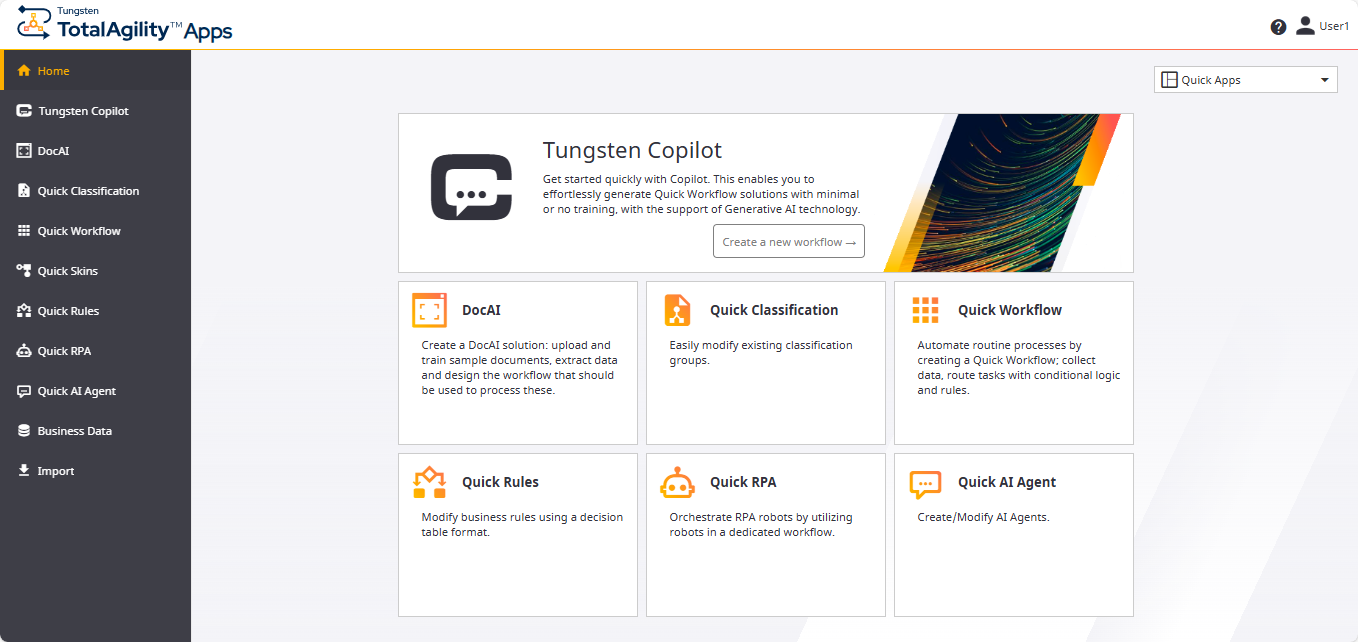
-
Click the following cards or menu to configure processes and Capture items.
Card Description Tungsten Copilot
Use this menu/card to open the Copilot where you can create a workflow solution using Generative AI technology by providing some information to ChatGPT. To start using Copilot, you must have already configured the AI provider integration in the TotalAgility Designer; otherwise, you are prompted to configure one.
DocAI
Use this menu/card to open the DocAI solutions page, where you can create a Document AI solution.
Quick Classification
Use this menu/card to open the Classification groups page, where you can modify existing classification groups.
Quick Workflow
Use this menu/card to open the Quick Workflows page, where you can create a workflow solution.
Quick Skins
Use this menu to open the Quick Skins page, where you can create and modify process skins to create different variants of a process template.
Quick Rules
Use this menu/card to open the Quick Rules page, where you can modify decision table business rules.
Quick RPA
Use this menu/card to open the Quick RPA Workflows page, where you can create an RPA workflow solution.
Quick AI Agent
Use this menu/card to open the Quick AI Agents page, where you can create an AI agent workflow solution.
Business Data
Use this menu to open the Business Data page, where you can create and modify business data.
Import
Use this menu to open the Import page, where you can import a TotalAgility Apps package.
-
A list of different design environments is available on the top right of the screen. You can switch between different
environments as needed.
-
Advanced Designer: Opens the Advanced Designer Home page.
-
DocAI Studio: Opens the DocAI Studio page.
-
Quick Apps: Opens the Quick Apps Home page.
After opening a designer if you switch to other designer, the latest designer is saved in database as the default designer. From that point on, all designer links (Advanced Designer, DocAI Studio, and Quick Apps) will redirect to this default designer home page. Additionally, if multiple designers are open in different browser tabs, after refreshing the browser tabs, all tabs displays the default designer home page.
You must have access permissions to "Designer", to open the Advanced Designer or DocAI Studio link. For more information, refer to "Access control list" in TotalAgility Designer Help.
-
- To navigate to the Home page from any page of the application, click Home.