A workflow consists of a series of steps and their settings. Typically it will include a recognition step, but it does not have to. Workflows allow you to handle recurring tasks more efficiently, because all the steps and settings are pre-defined.
Workflows are listed in the Workflow drop-down list - sample workflows plus any you create. You can choose to place an OmniPage agent icon on your taskbar. Its shortcut menu lists your workflows.
You can export your workflows to a network location by choosing Tools/Workflows to make them available to colleagues with OmniPage installed. Workflows created by others can be imported from a network location. In this case it is shared through a shortcut, so the workflow is not copied to your local computer.
Workflows are portable. If an imported workflow has a standard path (e.g. My Documents) for loading or saving files, the path will be adjusted to your computer.
C:\Users\<user name>\Documents
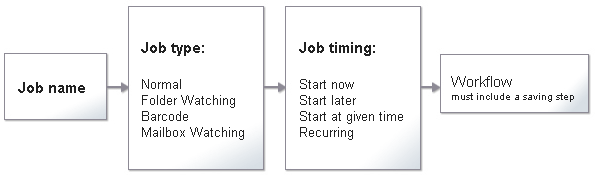
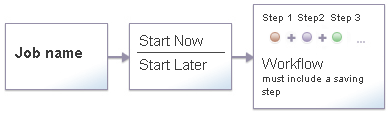
A job has a name, a type, timing instructions and a workflow linked to it. In OmniPage Ultimate, jobs can be scheduled to be performed automatically at one or more specified times in the future. Jobs may have different life cycles. The result (recognized document, scanned image, etc.) will be saved at the end of a life cycle.
Diagram 1: Jobs in OmniPage Ultimate
Diagram 2: Jobs in OmniPage
The Workflow Assistant serves for creating and modifying workflows, while DocuDirect serves for creating, modifying and managing jobs.
The differences between workflows and jobs are as follows:
Jobs include timing data, workflows have processing steps without timing instructions.
For jobs you must name input files or folders, for workflows you can be prompted at run time.
A workflow (except a barcode cover page workflow) can exist without a saving step, a job must always have at least one.
In the DocuDirect Job Wizard you can name a job and select a job type, then define the timing instructions. The required processing steps and settings can be set in the Workflow Assistant that appears automatically after the Job Wizard in DocuDirect.
|
In OmniPage Ultimate, you can specify folder watching and mailbox watching as job input, setup recurring jobs and the time options for watched folder jobs, create barcode cover page jobs and request E-mail notification of job completion. |
In OmniPage Ultimate, the following job types are available: Normal job, Barcode cover page job, Folder watching job and mailbox watching job (Outlook, Lotus Notes).
Normal and watching jobs can be recurrent. Recurring jobs consist of predefined steps with predefined settings to be processed automatically at recurring intervals. Barcode cover page jobs cannot be recurrent.
Two special DocuDirect job types generate PDF output. They both allow only one processing step. See Convert to PDF job and Make PDF Searchable job.