Important: Read the entire help topic before implementing UDVs.
 Important: Read the entire help topic before implementing UDVs.
Sets a user-defined variable (UDV) to a string value.
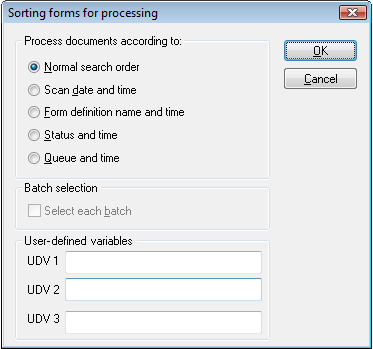
Use this method to assign up to three variables to forms, sets, or batches. You can then select these forms, sets, or batches in the FORMS dialog when you create an Interpret, Verify, and/or Transfer job description—or use the Set(Itrp/Veri/Tran)UDV method.
Unlike with queues functionality, UDVs are not inherited from forms to sets. That is, a form’s UDV does not affect any set that it may belong to.
A UDV specified in a job description is valid only for the object that was selected in the job. For example, if you select set definition "ABC" in the job description and then specify UDV 1 as "Head office" in the dialog, you will get only "ABC" sets with that UDV.
You will not get:
Any other sets that have their UDV set to "Head office."
Any forms or batches that have their UDV set to "Head office" (unless they also belong to a set that has its UDV set to "Head office".
You will get:
Forms that have their UDV set to some other value, if they belong to a set that has its UDV set to "Head office."
The three boxes available for selecting UDV in the dialog work like "OR". For example, if you type "Head office" in the box and "Top prio" in the box, you will get objects that either have UDV 1 set to "Head office" or UDV 2 set to "Top prio". You will not only get objects that have both those conditions. And you will not get objects that have UDV 2 set to "Head office".
If the UDV settings in the dialog are not filled in, the job runs as usual, and FORMS does not check the value in any UDV fields.
If you want the see the UDV values in the output, insert these variables in the transaction description:
#UDV1
#UDV2
#UDV3
The Manager module has no GUI for viewing UDVs or which objects belong to them.
Object.SetUDV(UDVNo, UDVValue)
|
Part |
Data type |
Description |
|
Object |
Object |
|
|
UDVNo |
Integer |
UDV number 1, 2 or 3. |
|
UDVValue |
String |
A character string with a maximum length of 79. Longer strings are truncated to 79 characters. |
0 if OK. -1 if UDVNo is less than 1 or greater than 3. See Event return value constants.
None.