Value
Description
2
Form identified.
Suggested action: Move all files supplied before the last JobDocumentRetrieve to a folder for identified files.
3
Form identified, with possible appendices. (Compare with 2 below.)
Suggested action: You do not have do anything.
4
Document recognized as a regular appendix to an identified form.
Suggested action: You do not have do anything.
5
Form with included appendices complete.
Note that this value can only appear if at least one of the form definitions in the job is defined with appendices.
Suggested action: Move all files supplied before the last JobDocumentRetrieve to a folder for identified files.
6
Set complete.
Note that this value can only appear if you are processing sets.
Suggested action: Move all files supplied before the last JobDocumentRetrieve to a folder for identified files.
7
Document recognized as an appendix to an identified form with front page removed (for example because of a blank page).
Suggested action: You do not have do anything.
8
Document recognized as an appendix to an identified form with back page removed (for example because of a blank page).
Suggested action: You do not have do anything.
9
Document recognized as a appendix to an identified form with front and back page removed (for example because of a blank page).
Suggested action: You do not have do anything.
10
The form is identified as an Unidentified form (The document is unidentified by FORMS but is accepted as a Form of the type UNIDENTIFIED, which later can be presented and processed in Verify. Note that the Status parameter value is 0.)
This value can only appear if is selected in the job description.
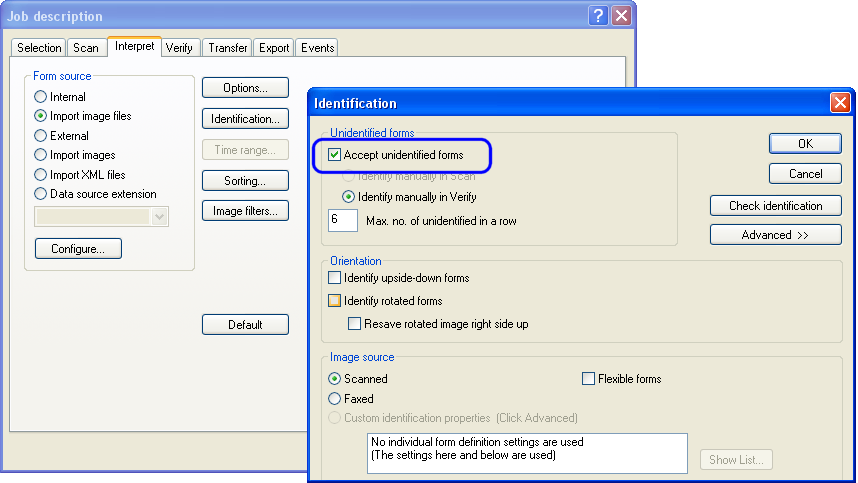
Suggested action: Move all files supplied before the last JobDocumentRetrieve to a folder for identified files.
11
Unidentified form (The document is rejected by FORMS.)
Suggested action: Move the file to a folder for unidentified files.
12
Form with included appendices incomplete— for example because of an invalid number of appendices.
Note that this value can only appear if at least one of the form definitions in the job is defined with appendices.
Suggested action: Move all files supplied before the last JobDocumentRetrieve to a folder for unidentified files.
13
Set incomplete.
Note that this value can only appear if you are processing sets.
Suggested action: Move all files supplied before the last JobDocumentRetrieve to a folder for unidentified files.
14
The most recently started form, set or batch is to be ignored.
Suggested action: Move all files supplied before the last JobDocumentRetrieve to a folder for unidentified files.
15
Batch complete.
Note that this value can only appear if you are processing batches.
Suggested action: Move all files supplied before the last JobDocumentRetrieve to a folder for identified files.
16
Batch incomplete.
Note that this value can only appear if you are processing batches.
Suggested action: Move all files supplied before the last JobDocumentRetrieve to a folder for unidentified files.
17
The form has been identified but not yet saved in the database. Here you can add information to the form.
Suggested action: You do not have do anything.