
Main window
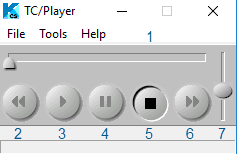
The following buttons are available in TC/Player:
-
Position: The horizontal slide bar represents the current position in the message.
A timescale is displayed on the bottom.
-
Back: Use this button to skip back by milliseconds as specified in .
This button is only active while playing. - Play: Use this button to start the playback.
- Pause: Use this button to suspend the playback.
- Stop: Use this button to stop the playback and go to start, or close the player if specified in Preferences.
- Forward: Use this button to skip forward by milliseconds as specified in Preferences.
- Volume: Use the slide bar on the right to adjust the volume level.
- Record: Use this button to start recording.