Vendor Locator
 The
Vendor Locator detects and evaluates the vendor
information from an invoice using results from a
Database Locator
combined with the results of other locators. The results provide
information such as vendor ID, name, address, VAT ID, banking details and
purchase order numbers, enabling the
Vendor Locator to match them with database records
and identify the vendor with a high level of confidence.
The
Vendor Locator detects and evaluates the vendor
information from an invoice using results from a
Database Locator
combined with the results of other locators. The results provide
information such as vendor ID, name, address, VAT ID, banking details and
purchase order numbers, enabling the
Vendor Locator to match them with database records
and identify the vendor with a high level of confidence.
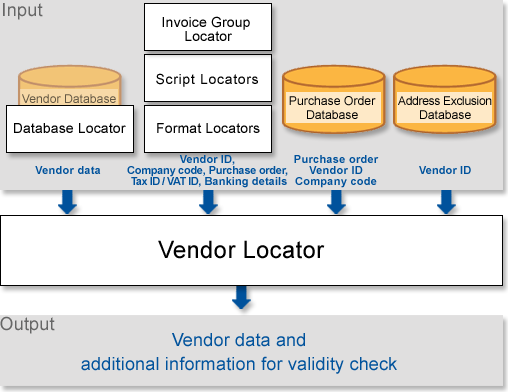
The primary input for the Vendor Locator comprises the results of a Database Locator that uses a vendor database. Use a purchase order database to improve vendor detection. A database containing addresses that should not be found, can reduce the number of detected alternatives.
Compared with the Database Locator that identifies the vendor based on a vendor database search, the Vendor Locator utilizes special rules against unique identifiers such as the VAT ID, company code, or banking details.
Increase the quality of the results and vendor detection by evaluating data from a Database Locator in combination with results from input locators, including the following:
-
Script Locator for company code input
-
Format Locator for Tax ID/VAT ID
-
Invoice Group Locator for vendor ID
-
Format Locator for banking details
Manage a Vendor Locator as follows:
-
Define the company code input
-
Define the Tax ID or VAT ID input
-
Define the Vendor ID detection
-
Define the bank details input
The Vendor Locator Properties window has the following tabs:
-
General tab
-
Purchase Order tab
-
Banking Details tab
-
Test Results tab