Azure Blob Storage Settings
In an Azure environment, you have to specify the connection settings to access Azure Blob Storage. As mentioned on the BlogStorage Element configuration, the following parameters are available:
-
Container Name
-
Storage Account Name
-
Storage Account Key (Primary)
Here is an example of a Blob Storage configuration element with each of the available settings.
<BlobStorage Primary="true"
             ContainerName="live-documents-tenant1"
             StorageAccountConnectionString="DefaultEndpointsProtocol=https;AccountName=demetrissstorage;AccountKey=OqSsPteGHVk2orjXA4JfqivTVKlgIqnE8I9WaMNHD3qMItz8VjGOIWfwWDnCEOyPFQqxqbU5c8rvqitFsI4rIw=="/>
You can find each of these settings as follows:
- Container Name
-
The Container Name has the following format:
[Deployment Type]-documents-[Tenant Name].
Where [Deployment Type] has a value of either live or dev, depending on its environment. [Tenant Name] is the name of your tenant.
- Storage Account Settings
-
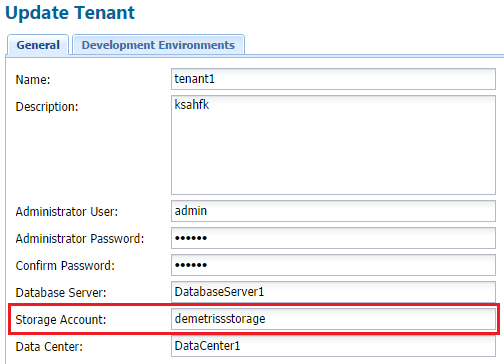
First, you need to know what storage account is used for your tenant. To find this, go to the Tenant Management System portal and open that tenant's settings. The Storage Account name is listed in the corresponding field.
For example:
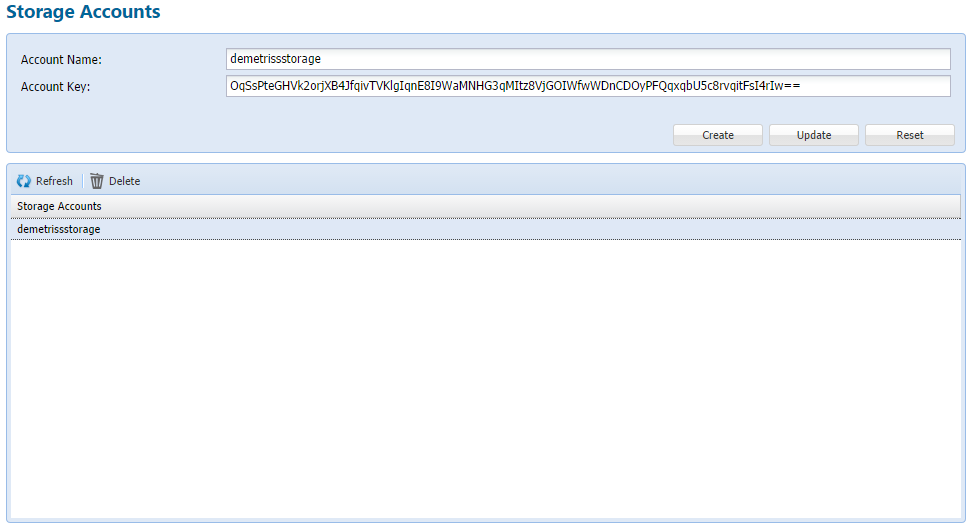
Once you know what Storage Account is used for your tenant, you can find the Storage Account Name and Key on the Storage Accounts page of the Tenant Management System portal. For example: