
Manually assign existing index or batch fields to folder fields
All the existing index or batch fields are listed in the Index Field column. If index fields are available, select an index field to assign it to the extraction field.
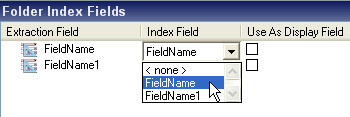
If you want to remove an extraction field assignment, select <none> from the list. Note that if an index or batch field was already assigned to another folder field, the assignment is changed and the other extraction field is set to <none>. A Kofax Capture index or batch field can be assigned to, at most, one folder field.
For index fields that are created inside the
Kofax Transformation Modules synchronization window (either manually or
automatically), a predefined
Kofax Capture field type called
ExtractionFieldType
is used. If this Field type is not available, an error message is displayed and synchronization is
not possible.
The Field type for the index field can be changed afterwords manually in the Kofax Capture Administration module.
If you assign an existing index field using the Synchronization Tool, its Field type is not changed.