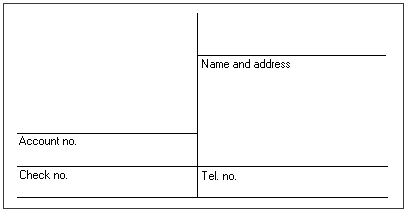
Flexible line maps are one type of adjustment field.
FORMS can create line maps based on actual lines on a form, and use these to identify the form and find the fields to be interpreted. All fields to be interpreted must have either the top or bottom (or both) and either side (or both sides) of its borders included in the line map.
Typical example of a form with a line map:
Each form definition to be included in the same job description must have a unique line pattern. That is, if you have different forms using the same line pattern and you want to include them in the same job description, do not use line maps.
Having the same line pattern means that two or more forms have the same pattern of horizontal and vertical lines, connected in the same way. Size and relative dimension are of little importance. (This is why they are called flexible lines maps.)
When you verify the forms, normal (full-screen) mode requires the original image if the forms are to be identified on the basis of line maps. You must select Verify from image files as an option in your Verify job description. If you do not intend to import images from files or export form images to image files, do not use line maps unless all the verification work can be done in fast verify mode.
The maximum number of horizontal lines is 64. The maximum number of vertical lines is 64.
The lines must be clearly visible. If the lines are thin or light-colored, for example, then be sure that your scanner settings are such that the lines are detected.