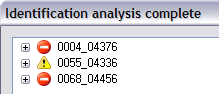
The Identification analysis complete dialog
When you check that forms can be identified in a job, this dialog displays the results.
The identification accuracy of each form definition is examined individually using both positive and negative image examples. The goal is that no negative-image examples are identified for each form definition in the job.
The results are separated by form definition as root nodes in the order they are included in the job. A root node consists of the name of the form definition and an icon indicating the extent to which identification succeeded.
The icons are:
|

|
The form definition correctly identifies all positive examples without any incorrect identification of the negative examples. No adjustments are necessary.
|
|

|
At least one of the example folders is empty. There were no problems with missing identification of positive examples or incorrect identification of negative examples. No known adjustments are necessary, but not all form definition checks are done.
|
|

|
The form definition did not identify all positive examples. There were no problems with incorrect identification of negative examples, but empty example folders may exist. You must add or change the adjustment fields on the form definition to avoid identifying forms manually, rescanning, etc.
|
|

|
The form definition identified at least one negative example incorrectly. There may be problems with missed identification and empty example folders. You must remove or change some adjustment fields on this form definition to avoid problems with incorrect identification. Exception: It is possible that the order of form definitions in the job, or set logic in the set definition, might ensure that the correct form definition is tested before this one. This would mean that the problem can be ignored. One such example would be a job that specifies a form definition without adjustment fields.
|
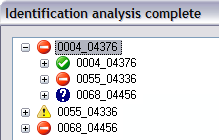
Expand the root nodes to see more detailed information about the relationships between form definition pairs. The subnodes correspond to the example folders, and the icons indicate the outcome of the identification test using the root form definition to identify the forms in the folder:
|
|
For positive examples (when the root node and the subnode have the same name), this icon means that all the examples in the folder were correctly identified. You still might want to expand the subnode to see if there are any adjustment fields not found on all examples.
For negative examples (when the root and the subnode have different names), this icon means that no identification was successful. Because this is as it should be, no further information is provided.
|
|
|
This example folder is empty. Expand the subnode to see the full path of the folder.
|
|
|
This icon is displayed in two situations:
-
The form definition did not identify all positive examples. Expand the subnode to see how the adjustment fields performed; expand again to see a list of the failed identification examples.
-
"Multiple hits" – namely, the adjustment field was found two or more times in the search area. This is a serious problem that should be fixed.
This icon is never used on negative examples.
|
|
|
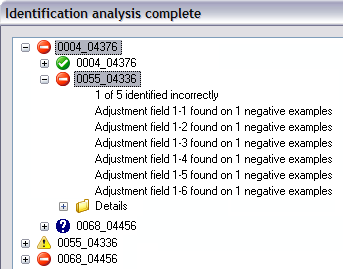
The form definition resulted in at least one incorrect identification of a negative example (the root and the subnode have different names). Expand the subnode to see statistics for the adjustment fields that caused the problem; expand again to see a list of the incorrect examples and a description of the reason for the failure.
This icon can also occur on positive examples when Identify upside-down forms or Identify rotated forms is used. The problem in this case is that an upside-down or rotated form might be identified without turning the form over or rotating it.
|
Additional details:
Example:
Related topics
Example of validation results used to improve identification accuracy of forms in a job (full description of validation results provided)
Checking that forms can be identified in a job
Improving the identification of forms in a job
Recommended guidelines when analyzing for optimal flexible-forms setup using existing form definitions
Identification settings: Overview
Flexible forms: Overview