
Configure Auto KV Extraction plugin
- From the Batch Class Management page, select your batch class and click Open.
- Go to .
-
Add the
AUTO_KV_EXTRACTION plugin to the list of
Selected Plugins.
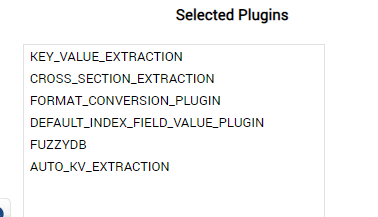
- Click Deploy to update the workflow.
- Go to .
-
Configure the plugin according to your requirements. Reference the table below for descriptions of the configurable
properties.
Configurable property Description Auto Extraction Enabled
This switch enables the plugin. Set to True to enable.
Enabled DLF List (or Batch Class Relative path to list)
Use this field to configure the list of index fields that should be monitored during validation. There are two available ways to list the index fields:
-
List of index fields separated by the pipe character ( | ).
If only one field is listed, it must be terminated with a pipe character ( | ). -
Enter the relative path to a text file that lists each index field line by line. For example: scripts-config\mydlflist.txt
Rules Filter Value DLF Name
Use this field to configure the rules to be filtered by a specific value, such as the Vendor ID, GST ID, or IBAN. To create a filtered rule, enter the name of the index field by which the rule should be filtered.
Leaving this field blank will create rules without a filter.DLF Value Overwrite Mode
Select Overwrite or Do Not overwrite The threshold option will overwrite only if the confidence calculated by Transact of a field is lower than the value below.
DLF Overwrite Confidence Threshold
This property is only used for the Threshold DLF Overwrite Mode. Otherwise, enter 0.
DLF Force Review Threshold
Auto rules will be assigned a confidence based on Auto Confidence Values assignment logic. If the confidence is below the value entered here, the DLF will be marked for operator review.
Rules Database Path
This property defines the location of the database rules. There are three available ways to configure this property:
- Leave the field empty to use the default location of [Batch_Class_Folder]\auto_kv_extraction\auto_kv_rules.db
- Enter a path relative to the batch class folder. For example, \scripts-config\mydatabase.db
- Enter an absolute path. For example, C:\Folder1\mydatabase.db
-