-
The cache decreases the overall load on RDBMS and uses fewer resources.
-
The request is cached only in the case when all the data is stored in the Data DB.
-
The cache is cleared according to the schedule and also after each data load of the objects related to cached requests.
Caching may be useful when you use the rounding interval property so that the data for the preceding part of the interval can be pulled from cache.
The dashboard designer should perform his own judgement on the project load and activities and if necessary, disable readers cache: in the View, find the Ignore cache property in the Property Panel and select the check box.
When data load is quite frequent. For example, the data load is scheduled every ten seconds and the probability that the same getData requests can happen during this period is very small.
The amount of allocated memory (depending on your data size) is insufficient.
When you try to debug or test your components or queries.
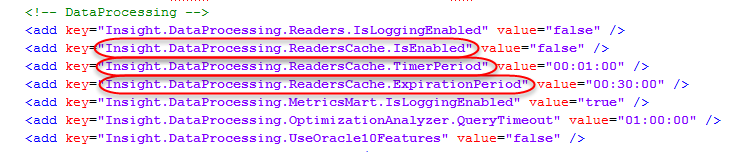
- Insight.DataProcessing.ReadersCache.IsEnabled: this property is set to false by default. Enables or disables cache.
- Insight.DataProcessing.ReadersCache.ExpirationPeriod: this property is set to 30 minutes by default. If the component is not required during this period, its cache is cleared. When the next query is addressed to this component, the query is routed to the database and the component's cache starts filling again.
- Insight.DataProcessing.ReadersCache.TimerPeriod: this property is set to one minute by default. It means the system checks every minute whether it is time to reset cache. Also, the cache is reset after every data load for all components of the project and the cached data is cleared for the components not required during the period defined in the "Insight.DataProcessing.ReadersCache.ExpirationPeriod" property.
-
Insight.DataProcessing.ReadersCache.MaxUsedMemory: by default, this
setting is set to 0, which means it is disabled. Use this setting to clear
readers cache according to the defined memory usage (the time interval for
memory usage checks is defined by
Insight.DataProcessing.ReadersCache.TimerPeriod).
For example, the values can be the following: "5 GB" - only 5 GB of physical memory could be used for web services; "-5 GB" - 5 GB of physical memory should be available, "50%" - only 50% of physical memory could be used by web services, "- 15%" - 15% of physical memory should be available. For this setting, B, KB, MB, GB, TB, PB are the supported size suffixes, and all numbers without suffixes are treated as being in Bytes.