Structuring documents by using barcodes
Your XBOUND process can be configured to structure documents using barcodes.
Background
Documents
in XBOUND represent business transactions, and often these transactions
have a hierarchical structure.  Example:
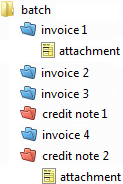
You can mirror this document structure in XBOUND by dividing the root document into sub-documents, which in turn can contain additional sub-documents.
A simple yet robust structuring procedure uses separator sheets with barcodes. These sheets mark where a document begins and ends, and they are manually inserted before the papers are scanned.
To configure a process to structure documents using barcodes
Using the XBOUND Management Center, open a console containing the Process Designer.
Under , open an existing process by clicking its name. Or create a new process and add process steps.
Create a document type for the root document and each of the sub-documents.
In the area, click :

Add and Scan Documents process step. Double-click the process step, select the root document type, and click .
Add and configure a Classify by Barcodes process step.
Create a process rule from the Scan Documents process step to the Classify by Barcodes process step.
Add and configure a Build Document Structure process step.
Create a process rule from the Classify by Barcodes process step to the Build Document Structure process step.
Save the process by clicking the button:
Assign the Classify by Barcodes activity to the XBOUND Activities Service.
Double-click the Build Document Structure process step.
Click and then the button.
Assign the Build Document Structure activity to the Activities Service, and then
restart
the Activities Service.