OCR language selection
You can select the languages used by OCR engines from the Plugin Configuration screen of the applicable plugins. The names of the fields are as follows:
-
OmniPage HOCR plugin: OCR Language
-
RecoStar HOCR plugin: OCR Country/Language
-
Tesseract HOCR plugin: OCR Language
When you select or type the language name, the widget will help you by giving suggestions. The complete suggestion list will be opened by the suggestion token, which is a semicolon (;) or by clicking in the field with predictive typing if no language is selected. The suggestion token will automatically list languages based on the user's input. As you start typing the first letters of the required language name, the widget will suggest languages according to the letters already entered.
The widget has several icons.
| Icon | Description |
|---|---|

|
Help icon to provide suggestions, such as using a semicolon (;) to display the language suggestion list. |

|
Error icon to indicate invalid input or left the field empty. It also indicates if you select a non-licensed language:
|

|
Warning icon to provide information and alert about conditions, such as missing information. (For example, the Tesseract Test-Data folder should contain test data for the selected languages.) |
Note the following:
-
If you do not specify the language in the HOCR plugin, English will be used by default.
-
During the OCR process with Recostar/OmniPage OCR engine, the system will check whether all selected languages are licensed. If not, then the empty HOCR will be generated for all pages and an error log will be created in the log file.
- If you need to OCR documents in Asian languages using the Recostar OCR engine, you need to purchase additional Transact OCR language license for Asian languages (Chinese, Japanese, Korean, Thai). Similarly, when using OmniPage, separate licenses have to be purchased for Arabic language and Asian languages (Chinese_Simplified, Chinese_Traditional, Japanese, Korean).
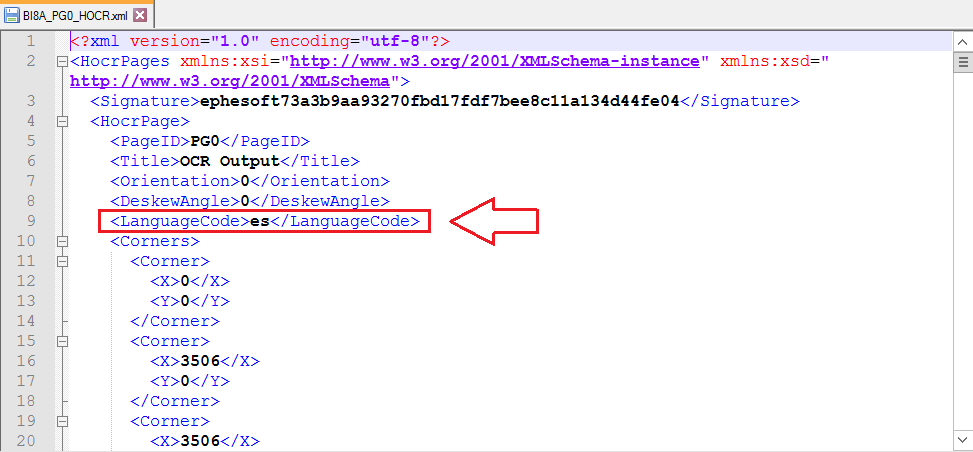
The information about selected languages is now also included in the HOCR.xml file. The file contains the <LanguageCode> tag with the code of the OCR language(s) specified in the RECOSTAR_HOCR, OMNIPAGE_HOCR, and TESSERACT_HOCR.