
Fraud detection using OCR font switch
Use the Font Recognition switch to detect potential fraud and tampering with processed documents. The HOCR file reflects the font style (Bold, Italics, and Underline) and font size if the Font switch is turned ON in the RECOSTAR_HOCR or OMNIPAGE_HOCR plugins. This allows the user to detect any data that has been manually altered or added to the documents. By default, the Font switch is set to OFF.
For example, the original amount of a field in a document is 1000 and the font size is 11. Assume this value is manually changed to 41000 and the 4 is written in a size 12 font. The system will recognize the font size and style in the HOCR file. This helps the user to identify that the document has been tampered with.
Tesseract does not provide any information on font detection. This feature is available only in the Recostar and OmniPage OCR engines.
Fraud detection includes the following features:
-
The HOCR schema includes font information from the data fetched by the Recostar and OmniPage OCR engines.
-
The RECOSTAR_HOCR and OMNIPAGE_HOCR plugins include ON/OFF switches which the user can configure to retrieve font information.
-
The following Web Services include font information in the HOCR file:
-
ocrClassifyExtract
-
initiateOCRClassifyExtractService
-
OcrClassifyExtractSearchablePDF
-
executeMobileUpload
-
extractFieldFromHocr
-
extractKV
-
classifyImage
-
classifyBarcodeImage
-
classifyHocr
-
classifyMultiPageHocr
-
decryptBatchInstanceHocrXml
-
decryptLuceneClassificationHocrXml
-
decryptTestHocrXml
-
keywordClassification
-
ocrClassify
-
ExtractKVForDocumentType
-
createHOCRforBatchClass
-
tableExtractionHOCR
-
-
The following Web Service can be configured to obtain font information in the HOCR file:
-
createOCR (a new parameter fontSwitch with an ON/OFF setting has been added to the input .xml file)
-
Fetch font information
Fetch font information through RECOSTAR_HOCR
- Go to and add the RECOSTAR_HOCR plugin.
- Open the RECOSTAR_HOCR plugin and turn ON the Recostar Font Switch.
- Click Apply to update the Batch Class configuration.
- Click Deploy to apply the changes in the workflow.
-
Process a batch to verify the changes in the HOCR schema.
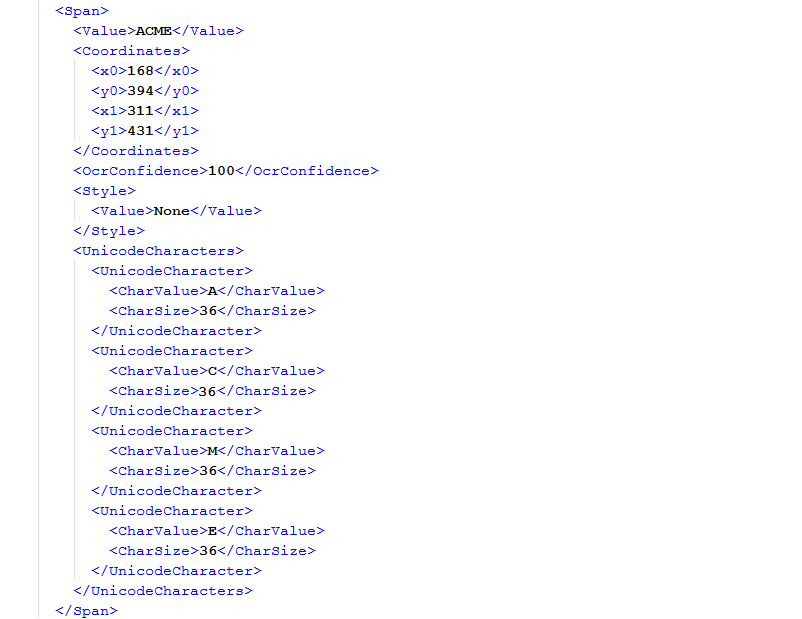
The newly generated HOCR schema now includes the font size of each character in the span. The HOCR file includes the <UnicodeCharacters> tag which contains the information about the value and size of each character. Also, the HOCR file has a tag <Style> which contains the information about the style (Bold, Italics, and Underline) of the span. If the style information is not fetched, its value is None.
-
To see the difference in the HOCR schema when the font switch is turned off, do the following:
- Turn OFF the Recostar Font Switch and save your changes.
-
Process a batch.
The information about font family and size is not fetched when the switch is turned OFF.
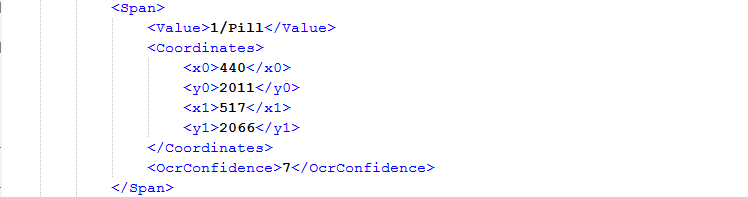
The Recostar OCR engine does not recognize combinations of font styles. For example, the style value is None if a character string is both bold and underlined.
Fetch font information through OMNIPAGE_HOCR
- Navigate to and add the OMNIPAGE_HOCR plugin.
- Open the OMNIPAGE_HOCR plugin and turn ON the OmniPage Font Switch.
- Click Apply to update the Batch Class configuration.
- Click Deploy to apply the changes in the workflow.
-
Process a batch with the Font Switch
ON.
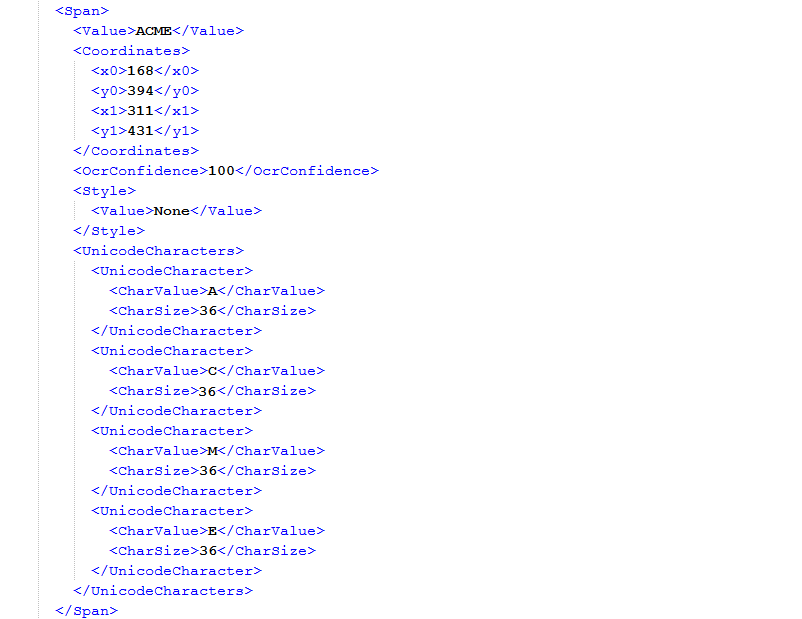
The newly generated HOCR schema includes the font size of each character in the span. The HOCR file includes the <UnicodeCharacters> tag which contains the information about the value and size of each character. Also, the HOCR file a tag <Style> which contains information about the style (Bold, Italics, and Underline) of the span. If the style information is not fetched, its value is None.
-
To see the difference in the HOCR schema when the font switch is turned off, do the following:
- Turn OFF the OmniPage Font Switch and save your changes.
-
Process a batch.
The information about font family and size is not fetched when the switch is turned OFF.
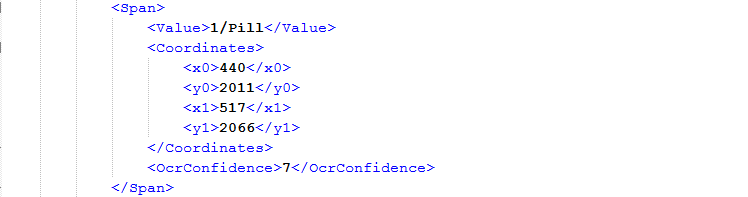
The OmniPage OCR engine does recognize the combination of font styles, giving comma-separated values when multiple styles are detected. However, it does not recognize the character size of individual characters. All characters in a word are always recognized as having the same size, even though some letters might be capitalized.