R Functions
To calculate data with the help of R, you need to define an R script to be executed by Insight during data load or an on-demand basis. R functions are Insight documents that contain R scripts and describe how to invoke R to calculate any field value.
You can create an R function either based on an R model or without it.
- In Studio, on the Documents Tree, right-click R Functions and select New R Function.
- Assign a unique, descriptive name to the new function and click OK.
-
On the
Model tab, define the
following:
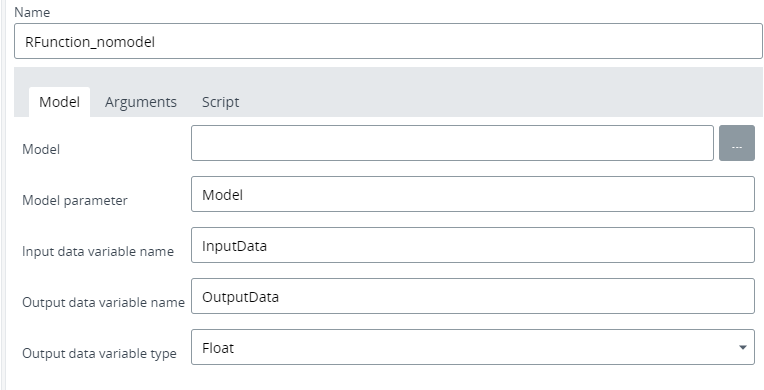
- Model (optional): Select from the list of previously created models.
- Model parameter (optional): Specify the name for the R model variable to be used in the R script.
- Input data variable name: Specify the variable name to be used in the R script.
- Output data variable name: Specify the variable name to be used in the R script.
-
Output data variable type: Select the output type from the
list.
See the sample screen below: the function uses no model (the Model line is empty) and has InputData and OutputData names defined manually.
-
On the
Arguments tab, define the
list of arguments to be used in the R script. Also, you may add additional
function arguments, because for example, for clusterization you need to specify
cluster count or maximum radius between clusters.
- Add variables that depend on record lines to the Function data arguments table. For example, a city can be a variable since it changes from line to line. All lines from this table are variable parameters of this function.
- Add constant parameters for the record to the Additional function arguments table. Such parameters are the same for all record lines: for example, the revenue is always measured in US dollars for the record.
In the sample screen below, IntValue is set as a data argument and IntConstant is added as an additional argument.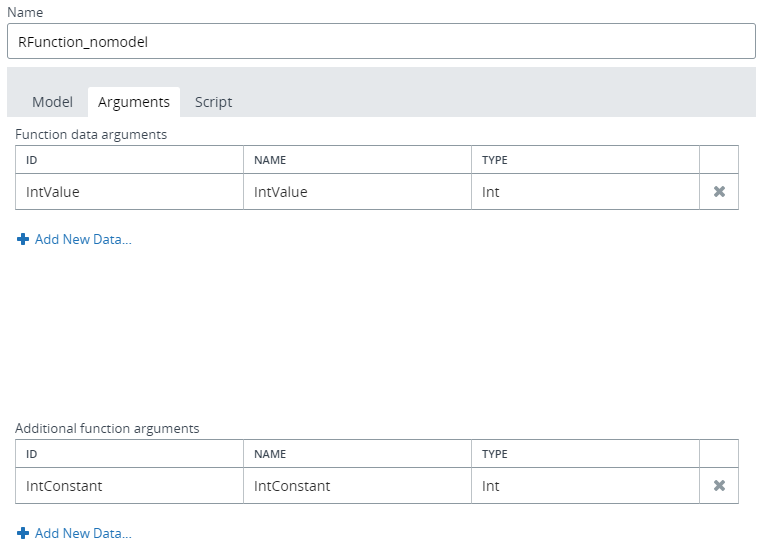
-
On the
Script tab, define the
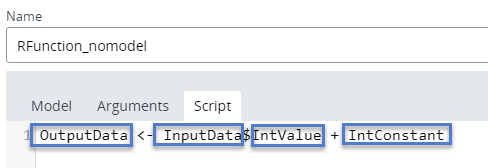
string for the R script to be executed during calculation. The script can use
the input data frame and function arguments by name. In the sample script shown
below, the
IntConstant argument is added (+) to
IntValue argument.
-
Save
 the R function.
Now the R function can
be used in a
derived field for records to calculate field
values. You can also see how to create a
sample derived field with the R function.