
Deployment scenarios
The two main components of Kofax Import Connector, Message Connector and KC Plug-In can be either installed on the same computer or on different computers. One KC Plug-In can connect to multiple Message Connectors. However, a single Message Connector must not be polled by multiple KC Plug-Ins. This topic shows some of the most typical scenarios.
You can use the Kofax Import Connector Performance Estimator tool to help you plan your environment. Contact Kofax sales for more information.
You can increase the performance of KC Plug-In by running multiple instances of the process (vertical scaling). To do so, increase the value of the parameter Number of KIC process instances. The extra instances may fail to start if enough hardware resources are not available. CPUs with multiple cores usually synergize well with increased number of Kofax Import Connector process instances.
Standalone scenario
In this scenario, Message Connector and KC Plug-In are installed on the same computer (along with Kofax Capture). This configuration does not offer any load balancing or failover mechanisms. You can easily run this scenario on virtual environment for tests / demonstrations.

Load-balancing scenario
In this scenario, a single instance of KC Plug-In connects to two (or more) Message Connector instances. Each instance runs on a separate computer. This type of configuration is recommended if you need to process many messages quickly. Document conversion by itself is a time consuming operation. Having multiple Message Connectors helps distribute the conversion load to several computers.
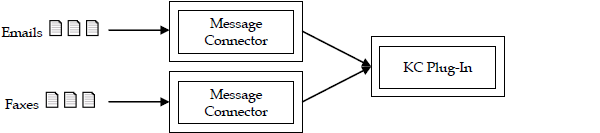
You can also install multiple instances of Message Connector on a single computer. Having multiple instances may not speed up document processing but you can use these instances to establish a certain prioritization. For example, a customer having two electronic imports, SMTP email and fax and expects large volume of email traffic but fewer high-priority faxes. Assigning fax import to a dedicated instance of Message Connector ensures that faxes are not stuck in the queue behind emails.
Failover scenario
In this scenario, two or more computers with Kofax Import Connector are grouped in a Windows failover cluster. Documents are routed to the active node. If that node fails, the next node continues without longer service interruption.
High performance scenario
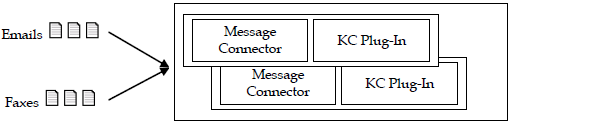
In this scenario, multiple computers run in parallel and import documents from folder.
A single server of Kofax Import Connector (for folder import) and Kofax Capture can run process approximately 30 million pages/year. Four servers (two of which run as virtual machines in the same hardware box) scaled in linear fashion can process approximately 125 million pages/year. To process more than 30 million pages/year, you should add additional instances of Kofax Import Connector on additional virtual machines or physical computers.
For optimal performance, install both Message Connector and KC Plug-In on the same computer. Set the value of the Prefetched messages parameter in Message Connector Configuration to achieve better performance.
In an high-performance environment, the value 40 yielded the best results.