
Define barcode anchor zones
You may define a barcode anchor zone by proceeding with the following steps:
-
Click .
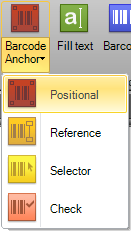
A drop-down list appears with buttons for the different types of anchor zones.
Barcode anchor zone type selection
-
Click any of the anchor zone types. The cursor shape
visually adopts to the selected anchor icon with a cross-hair in its top-left
corner indicating that you can use it to mark an area as a particular type of
zone.
The following cursors may appear depending on the selected type of anchor zone:
-
Positional barcode anchor cursor:

-
Reference barcode anchor cursor:

-
Selector barcode anchor cursor:

-
Check barcode anchor cursor:

-