-
Create an archive transaction description as shown below.
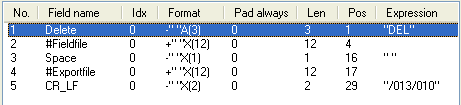
Use #Importfile instead of #Exportfile if you are importing image files to FORMS rather than exporting them.
-
Close the Transaction description dialog and specify a name for the transaction description when prompted.
-
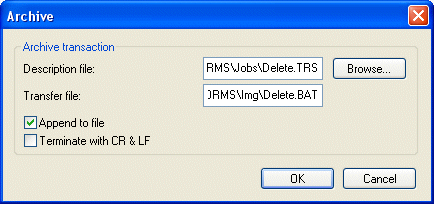
In your Transfer job description, specify the archive transaction description and the transfer file (which you will use as a batch file). It is usually most convenient to place the batch file in the same directory as the image files.
-
Select Append to file in the Archive dialog. This allows you to send data from multiple Transfer sessions to the same batch file.
-
Deselect Terminate with CR & LF, because you already specified in the archive transaction description that each line is terminated in this way.
-
Close and save the Transfer job description.
-
After you run the Transfer job, execute the batch file that was created (Delete.bat in this example). All image files containing forms are deleted unless there is a corresponding file containing field images.
It can be convenient to create an icon for the batch file and place it in the FORMS group folder. Other users can then simply double-click the icon to run the batch file after transfer.