
Audit
The Audit screen lets you check the history of changes to all parameter entries of a certain time span.
After filling the Valid from and Valid to fields and clicking the Retrieve button you get a list (if there were changes) with the following columns:
- User - the user that did the change
- Timestamp - date and time of the change
- Action - one of the actions Create, Modify and Delete
- Table Type - the type of the entry, one of Configuration Server Address, Configuration Section, Address Map
- Id - the Id of the item
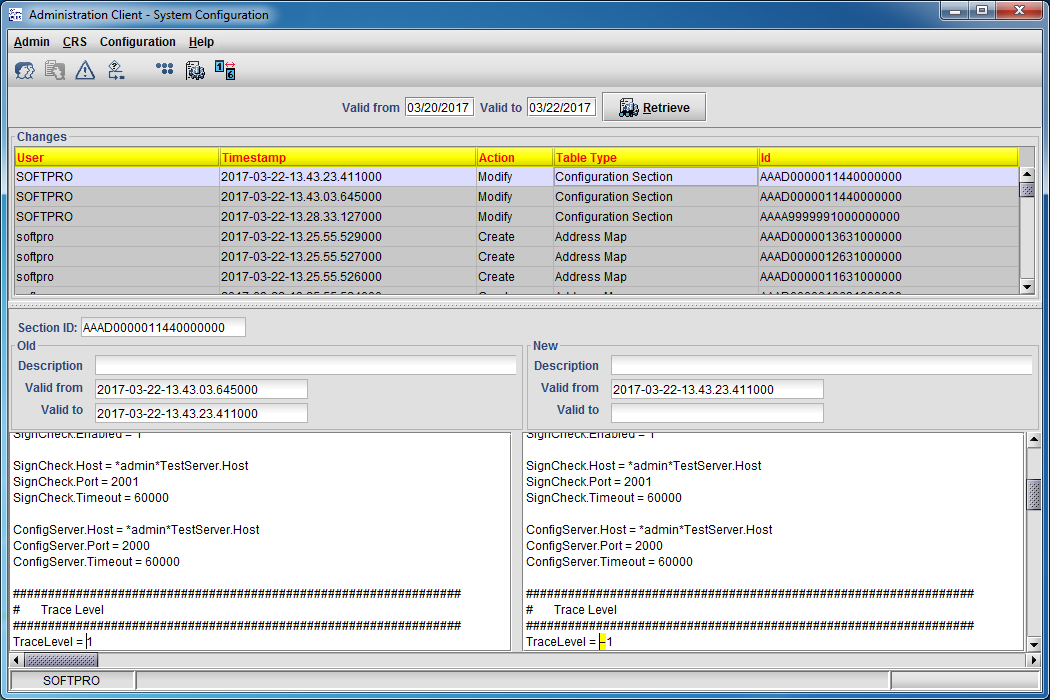
To see the content of an item, just select it and double-click or press Enter or Space. If the action is Modify, both contents are displayed: before and after the change. Otherwise only one of the two display areas in the lower part will be filled with data.
To open the Audit screen select
Configuration > Audit
or click the button
 .
.