
Design Studio changes
This topic describes Design Studio changes in behavior.
Project referencing changed
To support environments with multiple Management Consoles, in , the "Use as Primary" option is removed. This means that Robots located in local projects can no longer use project scoped services provided by Management Console, such as Vault, Robot File System, TotalAgility, OAuth, Document Transformation Service, and Constants. In Design Studio, to execute Robots that use such services, place your Robots in the shared project.
In Basic Engine Robots, on the Lookup Password step, the "Project Name" property is removed.
Library protocol discontinued
You can no longer use the Tungsten RPA non-standard library protocol used to refer to a file in the robot library.
Modify your Robots to use the Robot File System instead.
Modify your Basic Engine Robots to get the files as input or place the files on a web server.
Create Robot Library File option removed
In project context menu, the "Create Robot Library File" option is no longer available.
Nine-grid finder discontinued
The nine-grid finder is decommissioned.
Robot URL prefix renamed
The prefix for the robot URL used to open a robot file in Design Studio, changed from kofaxrpa: to tungstenrpa:.
Refer to Open files with URL in the Tungsten RPA Help.
Local desktop automation and Bundle step discontinued
Local desktop automation is removed.
In Robots, the Bundle step is no longer available.
Mail step discontinued
In Robots, the Mail step is discontinued. You can no longer run your existing robots that use this step. Use the Email step instead.
Refer to Email in the Tungsten RPA Help.
Browse step changes
The Browser option is removed. Robots created in older RPA versions require no further changes.
Calculate Key step changes
In Robots, the Variable property of the Calculate Key step changed its name to Record Value.
Refer to Calculate Key in the Tungsten RPA Help.
Execute SQL and Query Database step changes
For and Input/Output properties, the "Manual Parameter Details" option is renamed to Manual Parameter.
Convert Using JavaScript changes
In Basic Engine Robots, the Convert Using JavaScript converter no longer requires a semicolon at the end of the script.
Warnings changed to errors
In Robots, expressions consisting only of constants, now generate and display errors instead of warnings if these constants are evaluated as failing. This change in behavior ensures better robot building and prevents robots from execution on Management Console. Previously, it was possible to start execution of such a robot on Management Console and the robot would fail when the execution reached the step with a warning.
Heuristics for generating finders changed
Generation of finders in CEF is improved.
Improved animation detection in CEF
Guards now delay while the found object is affected by an animation on the web page (such as being shifted in or out).
Improved context menu
In the Recorder View, if the context menu contains a long list of variables, another "More" submenu appears.
Try-Catch step and finder analysis
Finder analysis determines which finders may exist at a given flow point in a robot. Also, it shows errors when a finder that cannot be guaranteed to exist at a given flow point, is used there. When a robot executes, it removes such finders from the state before proceeding to the next flow point.
Finder analysis did not work correctly with the finders after the Try-Catch step, and this issue has been resolved. However, this fix may affect some robots:
-
Some robots created in older RPA versions, if they are edited in this or newer version of RPA, may not run any more.
-
Some robots created in older RPA versions will still be able to run on RoboServer, if they are not edited in this or newer version of RPA.
The following is an example of a robot that did not have an error before the finder analysis fix, but has an error if edited and saved in RPA 2025.2.
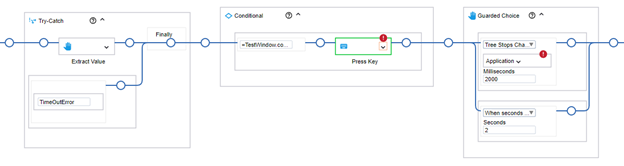
The Press Key step uses a finder from the Extract Value step. The Extract Value step is actually a Guarded Choice step that contains Extract Value step. The Finally block removes the finder. If the extraction times out and no finder is added to the state by the Extract Value step, there is no guarantee that the finder exists after the Try-Catch block.
To fix the robot, move the steps following the Try-Catch step inside the Try-Catch block.
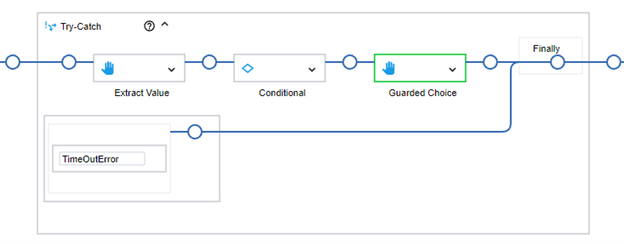
When execution reaches the Press Key step inside the Conditional step, we can be sure that the finder exists.
Save As dialog in CEF
Previously, when you saved a file in CEF using the Save As dialog, after selecting Save, the application tab was left open. After implementing the fix, the tab now closes automatically. This change may affect robots created in older RPA versions that have a step that closes the save dialog application tab.