
JSON in Robots
Tungsten RPA 2025.2 introduces JSON support in Robots:
Refer to Work with JSON in Robots in the Tungsten RPA Help.
JSON type
A new built-in JSON type is added. It is a simple type like text or number and represents JSON values.
In the Robot definition pane, select JSON type for input and variables.
Refer to JSON type in the Tungsten RPA Help.
JSON editors
- Input editor
-
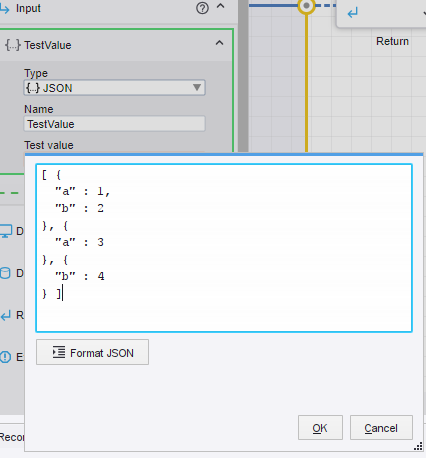
In the Robot definition pane, add an input, select JSON type, and type a name. The input editor for JSON supports formatting and validation.
- Expression editor
-
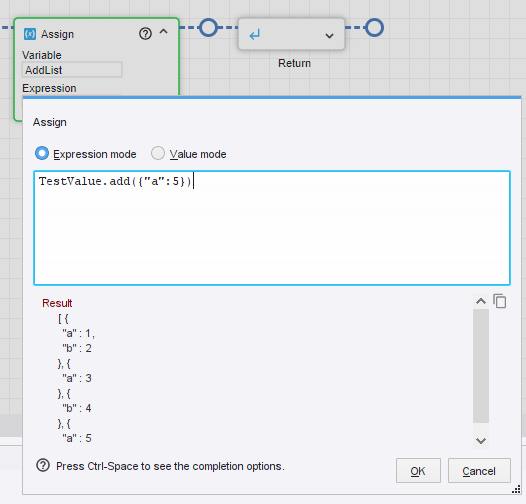
In the Expression editor, type JSON expressions and values and view the result instantly.
JSON steps
In Design Studio, the following five JSON steps are now available for Robots.
|
JSON step |
Description |
|---|---|
|
Find JSON Object |
Locates the first or all objects in a JSON value that meet a specified condition using a depth-first search. |
|
JSON Loop |
Loops over elements in the array, key/value pairs in an object, or all objects in a JSON value. |
|
Update JSON |
Overrides a part of a JSON value from a variable with a new value and stores the result in a variable. |
|
Lookup JSON |
Locates a part of a JSON value and stores it in a variable. |
|
Sort JSON Array |
Sorts a JSON array of strings, numbers, or objects based on a given key. |
Refer to JSON steps in the Tungsten RPA Help.
JSON tab
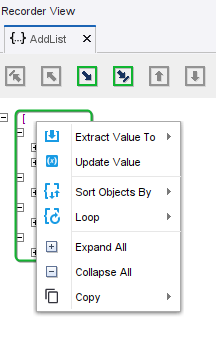
In Design Studio, a JSON tab is added to the Recorder View. It displays a JSON input or variable as a tree structure.
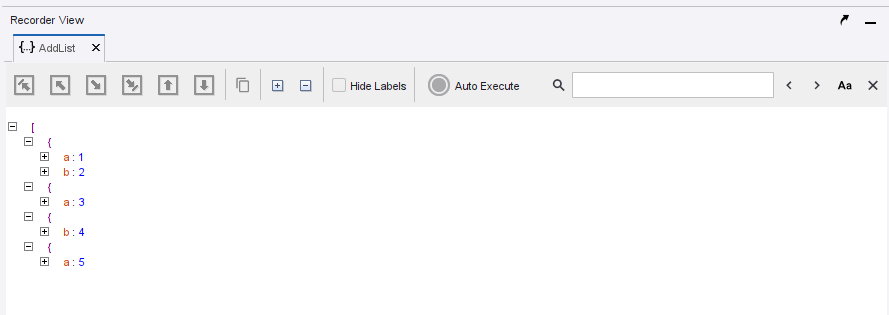
Open the JSON tab by right-clicking the required Input or Variable value in State and selecting Open JSON.
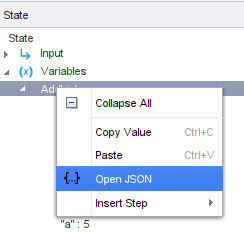
In the Recorder View, use the JSON tab context menu to either add steps to the Robot workflow or work with JSON values.
Refer to Actions on JSON tab in the Tungsten RPA Help.
JSON expressions
Refer to JSON expressions in the Tungsten RPA Help for detailed information about expressions.
JSON functions
Up to 40 functions associated with the JSON type are added:
-
Conversion functions
-
Test functions
-
Parse and Stringify functions
-
Object functions
-
Array functions
-
Array creation functions
-
Path functions
Refer to JSON functions in the Tungsten RPA Help for examples of available functions.