
Management Console changes
This topic describes Management Console changes in behavior.
CyberArk
CyberArk is now integrated with the new Vault feature.
In , the "CyberArk configuration" section is renamed to CyberArk and the "CyberArk applications" section is removed. You can now configure your CyberArk applications on the Secrets tab located on the Target systems tab in . Be aware that Secrets tab is hidden unless CyberArk is enabled.
Refer to CyberArk and Create target systems in the Tungsten RPA Help.
OAuth
OAuth apps and users are migrated to the new Vault feature. Additionally, the following changes are made.
- OAuth is removed from Robot Lifecycle Management.
In , OAuth is removed from the list of the objects that can be synchronized.
-
"OAuth user" is renamed to OAuth clients.
Refer to Vault in the Tungsten RPA Help.
Password store
Password store and passwords are migrated to the new Vault feature.
The "Move password entry" option previously available in Password store is removed. It is no longer possible to move password entries from one project to another.
Refer to Vault in the Tungsten RPA Help.
Password Store Client role renamed
The "Password Store Client" role is renamed to Vault Client.
Refer to Management Console user roles in the Tungsten RPA Help.
Revoke tokens option removed
In , the "Revoke tokens" option is no longer available.
License
The following values are now read-only and hidden behind asterisks if added using the configuration files:
-
Production license key
-
Non-Production license key
-
TotalAgility server URL
Refer to License in the Tungsten RPA Help.
Add/edit password access for robot renamed
In , the "Add/edit password access for robot" context menu option is renamed to Modify robot access to Vault.
Refer to Actions on robots and Robot access in the Tungsten RPA Help.
Auto-selected cluster in database mappings
In , when adding a database mapping, the cluster list is read-only and automatically contains the name of the cluster configured in the project, if in the related project, the Use only Service Cluster in project option is selected.
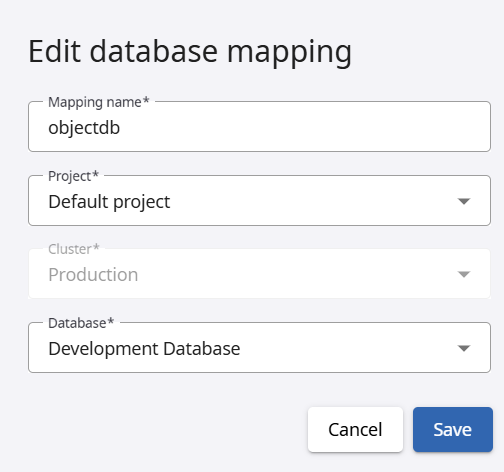
Refer to Create database mapping and Create a project in the Tungsten RPA Help
Date and time added to logs
On Tomcat, events from Management Console are now logged in with date and time by default.
Email trigger for shared account
It is now possible to set up email triggers to the Microsoft 365 shared account using IMAP with the user name in the format such as user@maindomain.com\shared-mailbox.