
Settings menu
The Settings menu includes the following menu items:
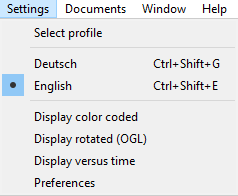
Select profile
Enter a profile name in the Select profile dialog box and click OK.
Deutsch
Select this menu item to display all dialogs and information in German.
English
Select this menu item to display all dialogs and information in English.
Display color coded
With this menu item the settings of the color-coded view for signature features are displayed. This includes a color table for the dynamic signature features (x,y axes).
Right-click the color bars to change the color of the selected signature feature individually. You can set the color for both the minimum and maximum values of the signature feature. A signature feature is displayed by selecting the check box. One, two or more features can be selected. All selected features are displayed at the same time.
To save the defined values as default values, confirm with OK.
This dialog box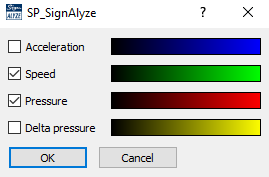
contains the following dynamic features:
- Acceleration
- Speed
- Pressure
- Delta pressure
Display rotated, Display rotated (OGL)
These menus pop up the settings dialog for the view of a signature and the signature features in the third dimension. The display can be rotated as preferred.
Right-click the color graph to select the color of the displayed feature. Select the check box to show the feature in the graph. You can select exactly one dynamic feature to be displayed in the graph and projected onto the z-axes.
The values are used as default values, when you confirm with OK.
This dialog box
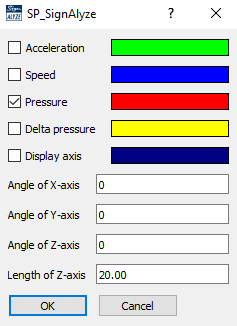
contains the following dynamic features:
- Acceleration
- Speed
- Pressure
- Delta pressure
- Display axes
- Angle of X-axes
- Angle of Y-axes
- Angle of Z-axes
- Length of Z-axes
Display versus time
This menu pops up the settings dialog for the view of a signature and the signature features versus time.
Right-click the color graph to select the color of the displayed line. Select the check box, to show the property in the graph. You can select several dynamic features and all selected features are displayed in the graph.
The values are used as default values, when you confirm with OK.
This dialog box
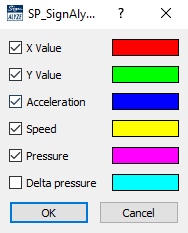
contains the following dynamic features:
- X Value
- Y Value
- Acceleration
- Speed
- Pressure
- Delta pressure
Preferences
With this menu item the following preferences can be set:
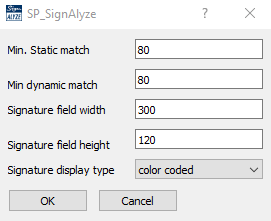
- Min. Static match
- Min. Dynamic match
- Signature field with
- Signature field height
- Signature display style