Home
On installing
Tungsten TotalAgility Advanced Studio
Home is the default web page that loads when you log in to
TotalAgility.
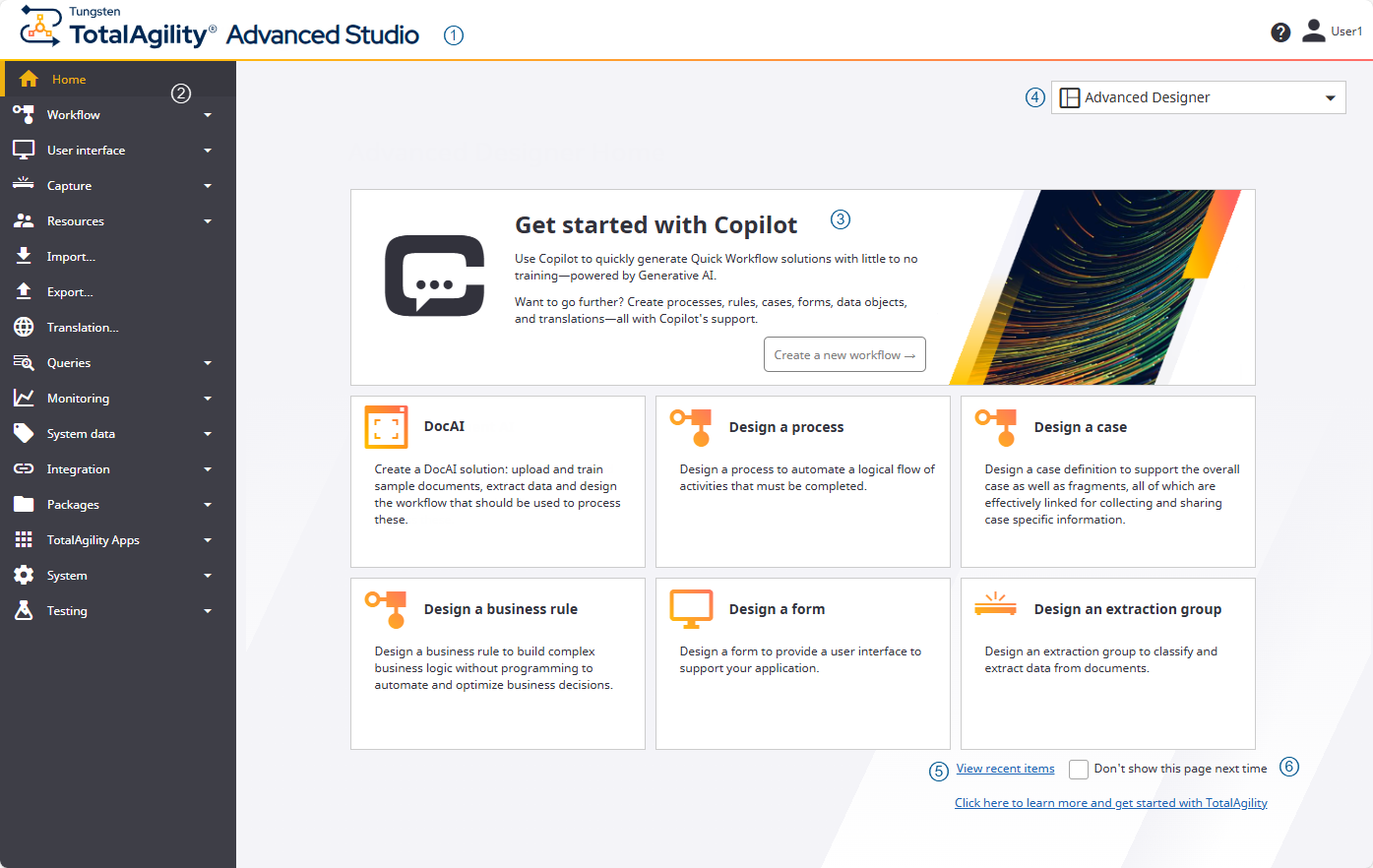
The Home page includes the following elements.
| S. No
|
Element
|
Description
|
| 1
|
Header bar
|
The header bar contains the following items.
| Item
|
Description
|
|

|
Click the
Tungsten TotalAgility
logo from anywhere in the application to return to the Home page. Alternatively, click
Home.
|
|
TotalAgility Advanced Studio
|
Application name -
Advanced Studio
|
|
Logged-on user's name
|
Click the username to display the following options:
|
|
|
Click to open
TotalAgility Advanced Studio
Help. Alternatively, open the help using the
Click here to learn more and get started with
TotalAgility link
available at the bottom of the Home page.
|
|
| 2
|
Navigation bar
|
A vertical list of links that appears on the left side of every interface window. The navigation bar includes
menus and submenus to design, import and export, and manage items.
|
| 3
|
Cards
|
The links to the items are available as cards for easy access. Click the following links to navigate to the
required menu and configure the items, such as process, case and more.
|
Card
|
Description
|
|
Get started with Copilot
|
Use this card to effortlessly generate
Workflow
solutions with minimal or no training, with the support of Generative AI technology.
You must have access permissions for
TotalAgility Studio
in the system settings to use this card.
|
|
DocAI
|
Use this card to
design a DocAI solution for automatic data extraction, classification, validation, and
delivery into various applications, processes, or repositories.
|
|
Design a process
|
Use this card to
design a process to
automate the logical flow of activities that must be completed.
|
|
Design a case
|
Use this card to
design a case definition to
support the overall case as well as fragments, all of which are effectively linked for collecting and sharing case-specific
information.
|
|
Design a business rule
|
Use this card to
design a business rule to
build complex business logic without programming to automate and optimize business decisions.
|
|
Design a form
|
Use this card to
design a form to
provide a user interface to support your application.
|
|
Design an extraction group
|
Use this card to
design an extraction group
to classify and extract data from documents.
|
|
|
|
| 4
|
Design environment list
|
A list of different design environments is available on the top right of the screen. You can switch between
different environments as needed.
-
TotalAgility Advanced Studio: Opens the
Advanced Studio
Home page.
-
DocAI Studio: Opens the
DocAI Studio
Home page.
-
TotalAgility Studio: Opens the
TotalAgility Studio
Home page.
After opening a designer if you switch to the other designer view, the latest designer is saved as your default
designer.
You must have access permissions to
"Advanced Studio", to open the
TotalAgility Studio. For more information,
see
"Access control list" in Access settings.
|
| 5
|
View recent items
|
Opens the
Recent items
page.
|
| 6
|
Don't show this page next time
|
If selected, you are taken directly to the
"Recent items" page every time you navigate to the Home page and every time you subsequently log on. Your
preference is automatically added to your profile. See
Edit profile.
|