
Process designer
TotalAgility Advanced Studio provides an easy-to-use process designing interface.
After you log on to TotalAgility Advanced Studio, navigate to and click New. On the Process page, you can design a process.
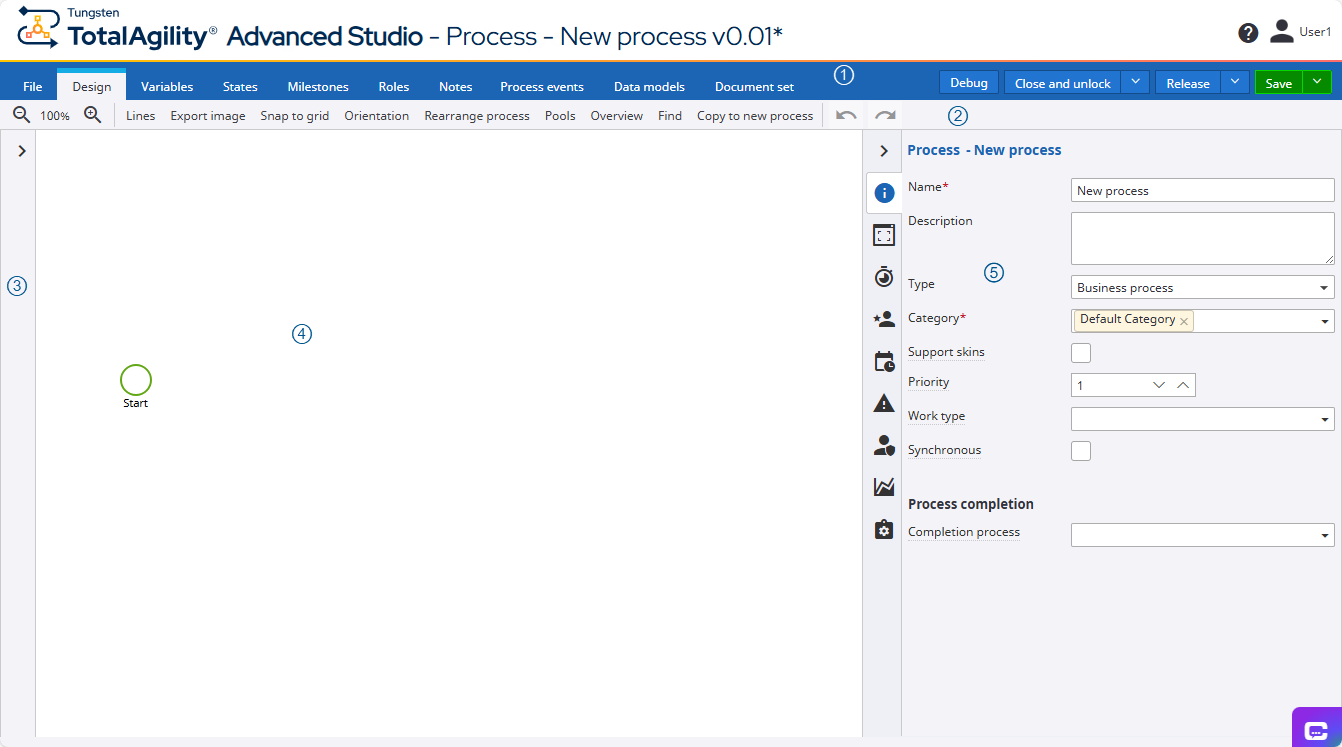
| S. No | Element | Description |
|---|---|---|
| 1. |
This bar provides the shortcuts for configuring process and case properties. |
|
| 2. |
This bar provides the shortcuts to basic process designing commands. |
|
| 3. |
This pane provides the basic tools for designing a process. A group of basic process designing elements appears on selecting a node on a process map. See Satellite. |
|
| 4. |
Canvas |
The central pane of the process designer provides the canvas for designing your workflow. By default, a Start node is added to it when you open the designer. |
| 5. |
Properties |
This pane displays the properties of a process, case, or activity, depending on your selection. |
How to: