
Support for authentication without federated security
TotalAgility supports manual logon as well as Windows authentication.
Manual logon
Manual login using username/password as defined in
TotalAgility
is supported in both
TotalAgility
Azure and on-premise.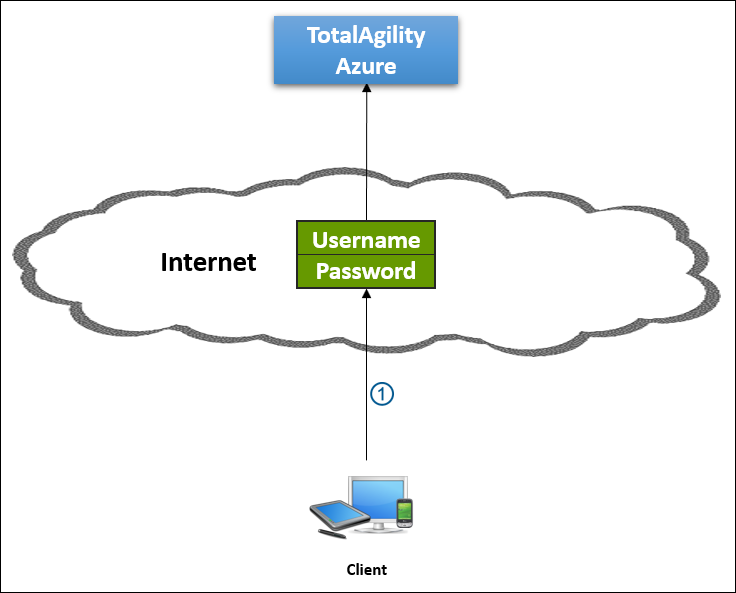
| Callout | Description |
|---|---|

|
Client logs on to TotalAgility using credentials (username and password). |
Requiring username/password authentication has the following disadvantages in TotalAgility Azure:
-
As TotalAgility maintains usernames and passwords, customers also expect support for retrieval of lost passwords; password expiry; lockout after several failed logins, and the rest.
-
Need to remove a user from TotalAgility if the user leaves the customer's company.
-
Does not support single sign-on; user needs to supply a username and password when logging onto TotalAgility.
Windows authentication
| Callout | Description |
|---|---|
|
|
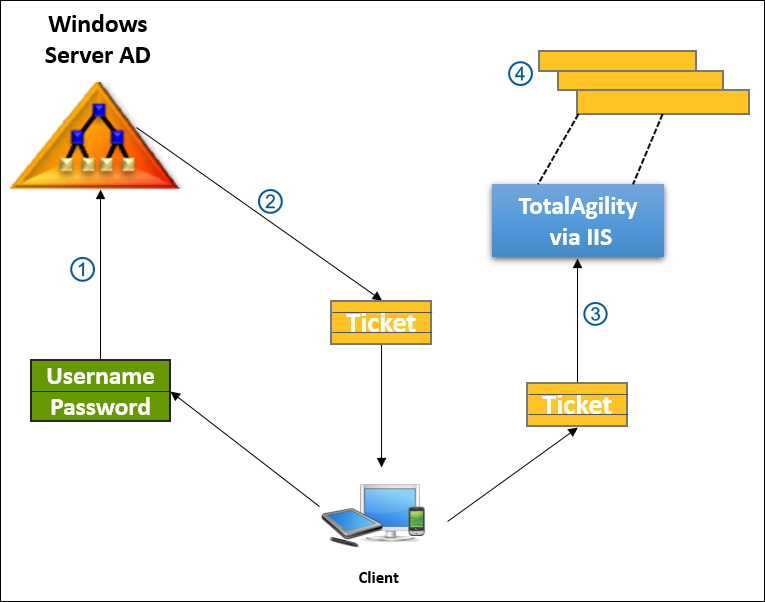
Client logs on to domain (Windows Server AD) using the credentials (username and password). |

|
Windows Server AD gets the Kerberos ticket for TotalAgility. |

|
Windows Server AD submits the Kerberos ticket to TotalAgility via the Client. |

|
TotalAgility uses the information in the ticket to verify the Client is authenticated. |