
The Currency field
Every document profile created using Tungsten ReadSoft Entrance 5.4 or later contains a Currency field. (In document profiles created using an earlier version of Tungsten ReadSoft Entrance, this field is handled a bit differently.)
Tungsten ReadSoft Entrance uses this field to determine the currency of the document.
- It looks for a three-letter abbreviation (such as USD, GBP, or EUR) or currency notation on the document. What it looks for is determined by your country profile.
- If found, it sets the value of the Currency field to the three-letter abbreviation defined to signify that currency. Example.
| Found on an invoice | Currency notation extracted | Abbreviation assigned to Currency field | ||
|---|---|---|---|---|
| $500.00 | ð | $ | ð | USD |
| € 300,00 | ð | € | ð | EUR |
| 750.00SEK | ð | SEK | ð | SEK |
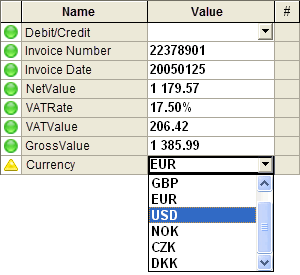
- In Verify, the Currency field is displayed along with other fields.
If the currency is not found, the
document definition's currency is used. If there is no
document definition, the
document profile's currency is used. In either case, the
Currency field is marked ( ), so you know it needs your attention, and you can change to a different currency in Verify.
- Example
Future
documents that are verified using the same
document profile—and where the position of the currency has not been learned in
Optimize—will automatically use the currency you selected
for the first
document. The Currency field is then set to
Complete.
- To include the three-letter currency designation in the output, add the #Currency system variable to the transaction description.
In Verify you can adjust the value of the Currency field, if necessary.
- The Currency field is different from other fields
-
- Titles are not used in the field profile.
- The field settings are adjusted differently.
- In Currency fields, the Sender field setting is selected by default.