System Task Throughput dashboard
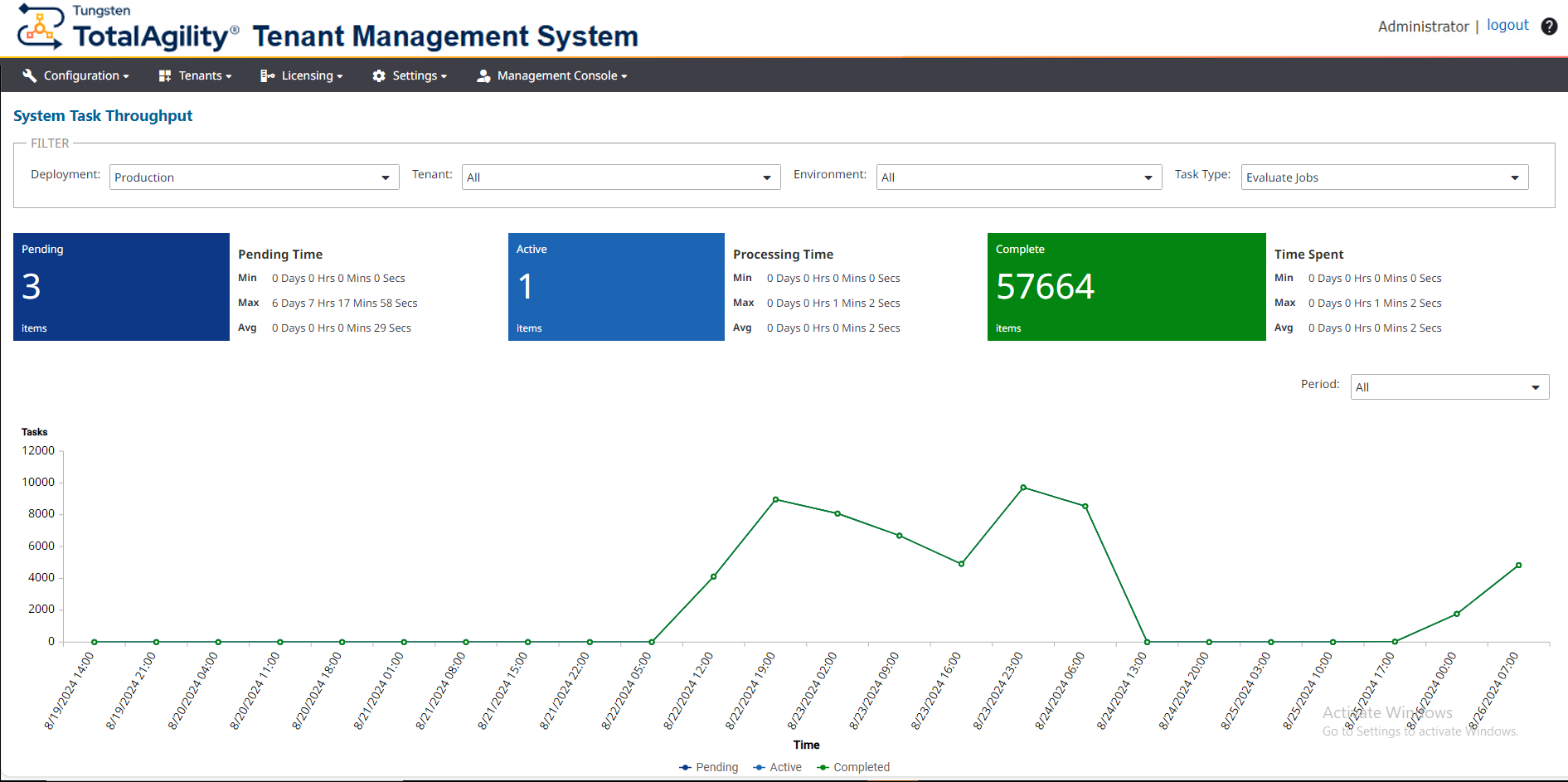
Use the System Task Throughput dashboard to view trends of system task executions. This helps you monitor the work being performed for all tenants.
-
On the header bar, click
.
The System Task Throughput page appears.
-
On the
Deployment list, select a deployment. (Default: Production)
The dashboard displays the following details:
-
All tenants, environments, and machines for the selected deployment. You can filter the data by Tenant. Environment, and Machine.
-
Separate tiles with the number of tasks in each status and the minimum, maximum, and average times.
-
A line chart depicting system tasks over a specific time range.
-
The rate at which tasks become pending, locked, and completed.
-
A list of all system task types. You can filter tasks based on type, status, and time range (including "All"). You can also filter based on tenant and environment.
When you change the deployment, or filter the current deployment by tenant, environment, and task type, the dashboard is updated accordingly. By default, the dashboard is automatically refreshed every minute. However, you can manually refresh the dashboard to update the data while retaining the applied filters by clicking Refresh.
The following image displays the statistics of system tasks.
-