
Archive audit tracking
Archive audit tracking allows you to generate a search activity report for the search actions performed by users in a group. You can generate a report for a single user or all the users of the group. The report provides you information about the search activity performed by the user(s) for the selected time period.
-
Go to
.
The Audit Report page appears.
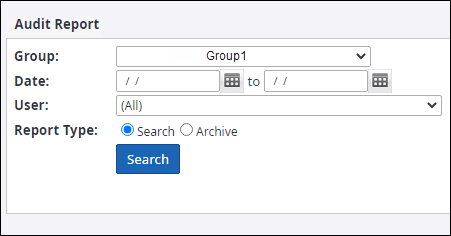
- Select the Group in which the users whose activity report is to be generated are located.
-
Using date picker
 , select the
date range for which you want to generate the user activity report.
, select the
date range for which you want to generate the user activity report.
-
Select the
User whose activity is to be generated.
Alternatively, you can also select (All) to generate a search activity summary report of all the users in the group.
-
Select either option for
Report Type:
- Search: Generates an audit report with information about the search criteria used by the user.
- Archive: Generates an audit report with information about tasks performed by the user on an item.
-
Click
Search. The list of users with their user ID, activity time, and description
of activity done or search criterion used by the user to perform search appears.
You can click
 to
download the report in CSV format.
to
download the report in CSV format.